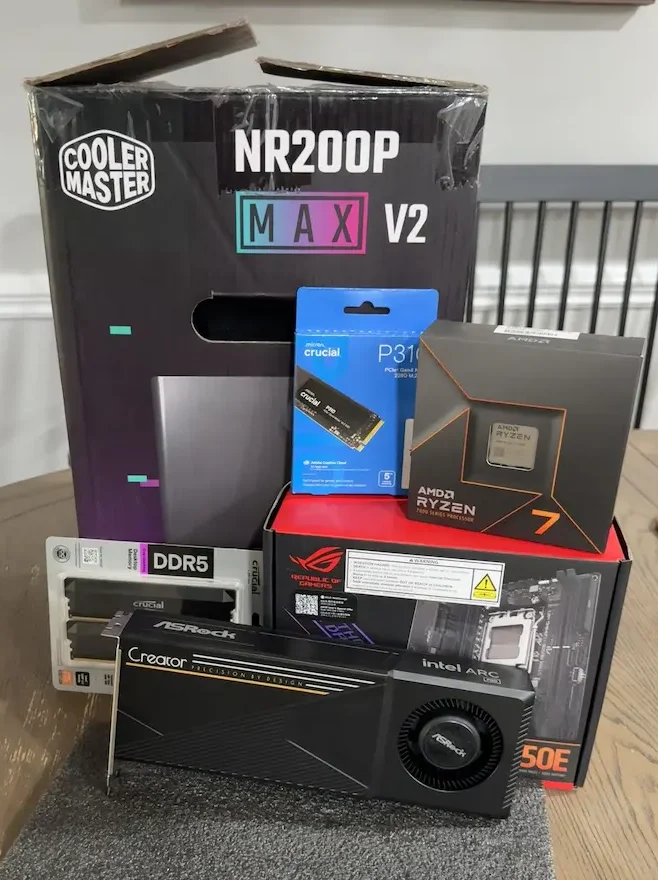
Prime Day usually pushes people toward obvious upgrades: gaming monitors, cheap SSDs, keyboards, or discounted graphics cards. I went a little weirder. I used the sales to build a compact local AI PC around a Ryzen 7 7700X, a Mini-ITX AM5 board, and an open-box Intel Arc Pro B60 with 24GB of VRAM.
This is not a normal budget gaming PC build. It is not a clean enterprise workstation either. It sits somewhere in the middle: a compact AM5 desktop with enough CPU power for daily work, enough GPU memory for serious local AI experiments, and just enough weirdness to make the build interesting.
The real story is not just the parts list. It is what this kind of build says about where local AI hardware is going. A few years ago, a compact 24GB VRAM system would have felt like workstation territory. With the right sale prices, open-box timing, and a little BIOS troubleshooting, it now starts to look like something a motivated home user can actually build.
The Prime Day Parts List
The core of this build came together from a mix of Prime Day deals and one open-box GPU find. Prices move quickly during sale events, so these are not fixed buying recommendations as much as a snapshot of what I paid or saw at the time.
| Part | Model | Approx. Price | Why It Matters |
|---|---|---|---|
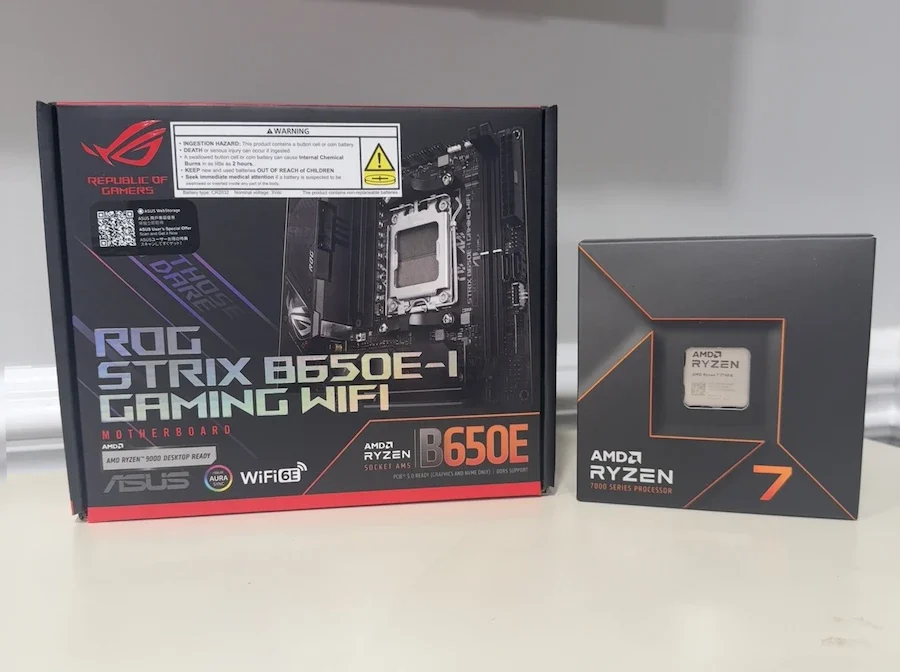
| CPU | AMD Ryzen 7 7700X | About $199 | 8-core Zen 4 CPU with strong desktop performance for productivity, multitasking, and AI workflow support |
| Motherboard | ASUS ROG Strix B650E-I Gaming WiFi | About $179 | Mini-ITX AM5 board with DDR5, PCIe 5.0 support, Wi-Fi 6E, and 2.5Gb Ethernet |
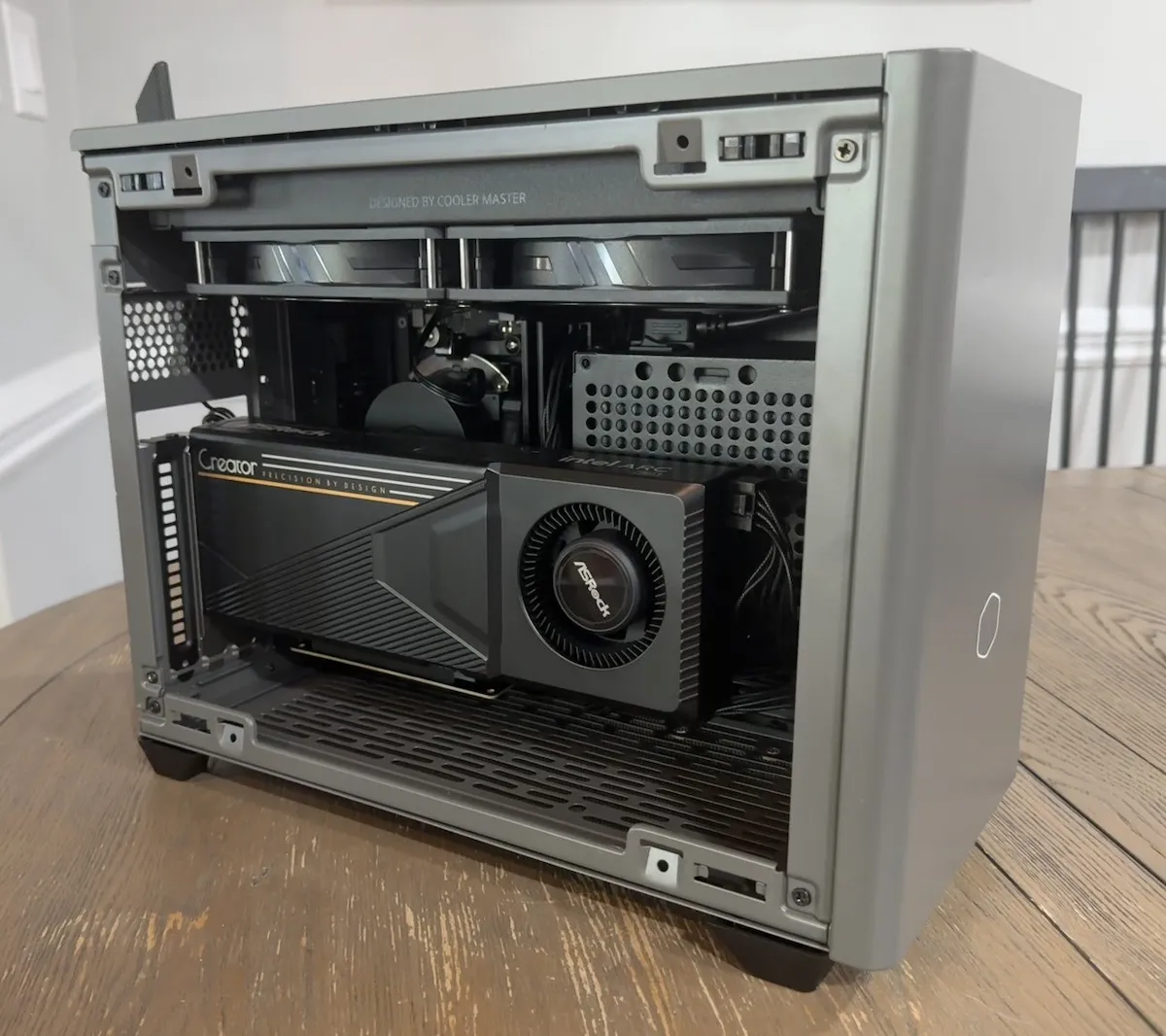
| Case / PSU / Cooler | Cooler Master NR200P Max V2 | About $250 | Includes the case, 850W SFX Gold power supply, PCIe riser, and 280mm AIO cooler |
| Storage | Crucial NVMe SSD | About $180 | Fast local storage for Windows, apps, AI models, datasets, containers, and project files |
| GPU | Intel Arc Pro B60 24GB | About $580 open box | 24GB of VRAM in a relatively affordable workstation-style GPU for local AI experimentation |
Before RAM and any reused accessories, that puts the listed build around $1,388 using the open-box Arc Pro B60 price. If the GPU is bought at retail instead, where it can be closer to the $650 to $700 range, the same basic build lands closer to $1,458 to $1,508.
That is not cheap in the absolute sense. But for a compact AM5 system with a 24GB GPU, a modern Mini-ITX board, an included 850W power supply, liquid cooling, and a future CPU upgrade path, it starts to look a lot more interesting.
The Real Hook Is the 24GB Intel Arc Pro B60
The Intel Arc Pro B60 is the reason this build is not just another Ryzen 7 small-form-factor PC. Most budget PC builds are judged by gaming performance first. People look at frame rates, ray tracing, upscaling, power draw, and how a GPU compares against the usual Nvidia and AMD options.
This card changes the conversation.
The Arc Pro B60 is not the obvious pick if your only goal is gaming. Nvidia still has the stronger software ecosystem for CUDA-heavy AI workflows, and AMD remains a strong option for traditional gaming value and open-source experimentation. But the B60 has one thing that immediately stands out for local AI users: 24GB of VRAM.
That amount of memory matters. Local AI is not only about raw compute. It is also about how much model data can fit on the card at once. A faster GPU with less VRAM can still feel limited if the model has to be heavily reduced, split awkwardly, or pushed into slower system memory.
That is where a 24GB card becomes attractive. It gives hobbyists, small publishers, homelab users, and AI experimenters more room to work with local language models, image tools, embeddings, document search, and testing environments without immediately running into the same VRAM wall.
This build is not about chasing the highest gaming FPS per dollar. It is about buying into local AI capacity at a price that feels closer to enthusiast PC hardware than enterprise workstation hardware. The Arc Pro B60 is interesting because 24GB of VRAM changes what a budget-conscious local AI system can realistically attempt.
The Arc Pro B60 Needed One BIOS Change Because of the Gen4 Riser
There was one setup issue that is absolutely worth mentioning: the Intel Arc Pro B60 did not work properly at first with the motherboard’s PCIe setting left on Auto.
At first, it was easy to suspect the GPU. Intel is still newer in the modern discrete GPU market than Nvidia or AMD, and Arc cards can sometimes come with more driver questions, compatibility quirks, or setup uncertainty than the more established options.
But in this case, the issue appears to have been much simpler: the Cooler Master NR200P Max V2 uses a supplied PCIe Gen4 riser cable. The fix was to go into the BIOS and manually set the PCIe slot from Auto to Gen4. After that, the card started working correctly.
That is an important distinction. The Arc Pro B60 itself may not have been the problem. The system may have been trying to negotiate PCIe behavior automatically through a Gen4 riser, and that combination did not behave cleanly until the slot speed was manually set.
This also shows why open-box PC hardware can be tricky. I cannot prove this is why the card was returned, but this is exactly the type of issue that can make someone assume a GPU is defective. A builder installs the card, the system acts strangely, the display does not behave as expected, or the card does not appear to work correctly, and the easy conclusion is: bad GPU.
In reality, it may have been a platform setup issue rather than a broken card.
That is one of the tradeoffs with small-form-factor builds and newer hardware combinations. The GPU, motherboard, BIOS defaults, and riser cable all have to cooperate. If you are building in a case like the NR200P Max V2 with a Gen4 riser, manually setting the PCIe slot to Gen4 should be one of the first troubleshooting steps before assuming the graphics card is bad.
If a GPU does not behave correctly in a small-form-factor case with a PCIe riser, do not immediately assume the card is dead. In this build, the NR200P Max V2’s Gen4 riser required manually setting the motherboard PCIe slot from Auto to Gen4 in BIOS.
Why the Ryzen 7 7700X Still Makes Sense
The Ryzen 7 7700X is not the newest or flashiest AM5 chip anymore, but that is part of why it works here. Around $199, it becomes a very strong foundation for a compact productivity and AI support system.
You get 8 cores and 16 threads, which is plenty for normal desktop work, writing, browser-heavy research, background services, Docker containers, light editing, and general system responsiveness.
For local AI, the CPU still matters because the GPU is not doing everything by itself. The CPU handles system orchestration, file movement, preprocessing, app overhead, browser work, and all the normal multitasking that happens around the actual model workload.
That makes the 7700X a good fit for this type of machine. It is powerful enough to avoid feeling like the weak point, but discounted enough that it does not eat the whole budget.
The B650E-I Board Is the Hidden Win
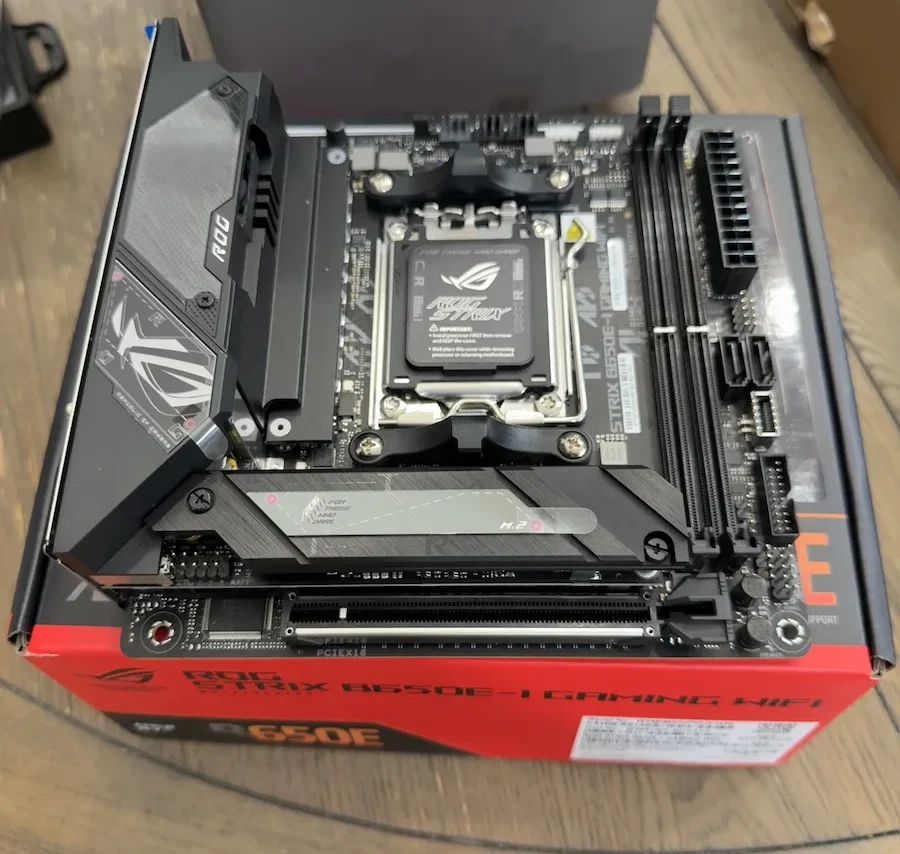
The ASUS ROG Strix B650E-I Gaming WiFi was another important part of the build because Mini-ITX pricing can get ugly fast. Small motherboards often cost more than they should, especially when they include strong connectivity and modern platform features.
At around $179, this board made a lot more sense. It keeps the build on AM5, supports DDR5, includes Wi-Fi 6E, gives the system 2.5Gb Ethernet, and provides the kind of modern I/O that makes a compact PC feel less compromised.
The bigger picture is upgrade flexibility. This is not a dead-end platform build. AM5 gives the system a future CPU upgrade path, and the B650E chipset keeps the board feeling current enough for a small workstation-style machine.
The NR200P Max V2 Solves the Annoying ITX Problems
Small-form-factor builds are fun until they are not. The case may look great, but then you have to worry about cooler clearance, power supply fit, cable routing, thermals, GPU mounting, riser compatibility, and whether your hands are small enough to install everything without inventing new curse words.
That is why the Cooler Master NR200P Max V2 was such a big part of this build. At around $250, it looks expensive if you compare it to a normal empty case. But that is not really what it is.
The NR200P Max V2 includes the case, an 850W SFX Gold power supply, a 280mm liquid cooler, fans, and the riser setup needed for the layout.
That changes the math. Instead of buying a case, SFX power supply, AIO cooler, and riser cable separately, the bundle gives you a cleaner starting point. For a first serious ITX build or a compact AI workstation, that matters.
It also makes the system feel more intentional. This is not a budget tower with a big GPU thrown into it. It is a compact desktop box built to hold serious parts without becoming a full-size workstation.
The Crucial SSD Is Not the Exciting Part, But It Matters
Storage does not get the same attention as CPUs and GPUs, but local AI can eat storage quickly. Models, containers, datasets, image-generation outputs, project files, caches, and Windows itself can pile up fast.
The TB Crucial NVMe SSD at around $180 gives the build a starting off point though more storage would be preferred. A local AI box is rarely just a single-app machine it tends to become a testing ground.
One week it is running a local language model. The next week it is holding image models, browser research, Docker containers, benchmark tools, and other half-finished experiments that absolutely should be cleaned up but if you are anything like me probably will not be.
The Software Side: AI Playground First, LM Studio Next
Once the hardware was working, I started with Intel AI Playground, and that was probably the right first step. It is one of the more user-friendly ways to begin experimenting with Intel Arc GPUs for local AI because it is built around running generative AI directly on your own system rather than relying entirely on cloud services.
That matters because the biggest challenge with Intel Arc for AI is not always the hardware. The Arc Pro B60 has the VRAM that local AI users want, but the software path is still not as universal as Nvidia’s CUDA ecosystem. Some tools work well, some require the right backend, and some may need extra setup before they fully use the GPU the way a new user expects.
That is why AI Playground feels like the sensible starting point. It gives the build an approachable way to test the card without immediately diving into command-line setup, custom backends, or compatibility rabbit holes.
I also plan to test the system with LM Studio, which is one of the most popular desktop apps for running local language models. That will be an important follow-up because LM Studio is exactly the kind of tool many normal users would reach for first.
The key question is not just whether the Arc Pro B60 has enough VRAM on paper. It is whether everyday AI apps can use that VRAM easily enough to make the card feel practical.
That is the real test for this build. The hardware value is obvious. A 24GB GPU in a compact AM5 desktop is interesting. The question is how painless the software experience becomes over time.
What This Build Is Actually For
This is where the build becomes more interesting than the parts list. On paper, you could call it a compact workstation, a local AI test box, a productivity PC, or an experimental gaming machine.
In practice, it is best understood as a local AI hobbyist system with enough general-purpose power to also be a real desktop.
That makes it useful for a few specific types of users:
- People who want to run local AI tools without depending entirely on cloud services
- Creators who want a compact AI workstation for writing, editing, research, and experimentation
- Homelab users who want a GPU box that does not take over the whole room
- Developers and tinkerers who want to test Intel GPU support as the software ecosystem matures
- PC builders who care more about VRAM capacity than traditional gaming charts
It is less ideal for someone who only wants the safest plug-and-play gaming experience. For that user, a more conventional Nvidia or AMD gaming GPU probably makes more sense.
It is also not the safest choice for someone who wants maximum AI software compatibility with minimum troubleshooting. Nvidia still has the advantage there because so many AI tools are built around CUDA-first workflows.
But that is not the only valid way to build a machine anymore.
The Tradeoff: VRAM Capacity vs. Software Maturity
The Arc Pro B60 is appealing because of its memory, but it also comes with a very real tradeoff. Intel’s GPU software stack is improving, and tools like AI Playground make the experience friendlier than expected, but the broader AI ecosystem is still not as simple as the Nvidia CUDA path.
That does not make the card bad. It just means this is a more experimental build, and buyers should be prepared for the occasional BIOS setting, driver update, or app compatibility question.
For me, that is part of the point. Local AI hardware is still changing quickly. The market needs more competition, more VRAM options, and more affordable ways for people to own useful AI hardware instead of renting every bit of compute from the cloud.
The B60 may not be the universal answer, but it represents the kind of hardware that makes the local AI conversation more interesting.
Why This Build Feels Different From a Normal Budget PC
Most budget PC builds are judged by a simple question: how much gaming performance can you get for the money?
This build asks a different question: how much local compute ownership can you get without jumping into workstation pricing?
That is a much more interesting question right now. Local AI is no longer just a novelty. More people are experimenting with private assistants, local writing tools, code helpers, image generation, document search, home servers, and small automation workflows.
Not everyone needs a monster multi-GPU rig. But a lot of people would benefit from a capable desktop that gives them room to experiment.
The combination of a discounted Ryzen 7 7700X, affordable B650E Mini-ITX board, bundled NR200P Max V2 chassis, and a 24GB Arc Pro B60 creates exactly that kind of system. It is compact, modern, upgradeable, and unusual in a good way.
The Approximate Cost Breakdown
Using the prices I paid or saw during the sale window, the build comes out like this:
- Ryzen 7 7700X: about $199
- ASUS ROG Strix B650E-I Gaming WiFi: about $179
- Cooler Master NR200P Max V2 with PSU and AIO: about $250
- Crucial NVMe SSD: about $180
- Intel Arc Pro B60 24GB open box: about $580
That totals about $1,388 before RAM and any reused accessories. With a retail Arc Pro B60 closer to $650 to $700, the build would be closer to $1,458 to $1,508.
Again, that is not bargain-bin cheap. But compared with many 24GB GPU options, compact workstation builds, or high-end gaming PCs, it is a very different value equation.
Early Verdict: A Weird Build, But a Useful One
This is not the PC I would recommend to everyone. Like most real-world PC builds, this one was not created from a perfectly optimized parts list. It was a mix of what I wanted, what was on sale, and what made sense for the kind of experimenting I have been doing lately.
The “want” part was the small Mini-ITX form factor. I wanted something compact, clean, and powerful without building another full-size desktop tower. The Cooler Master NR200P Max V2 made that easier because it bundled the case, power supply, AIO cooler, and riser setup into one package. That took some of the usual pain out of building small.
The “on sale” part was the Ryzen 7 7700X, the B650E-I motherboard, the Crucial SSD, and the case bundle. None of those parts were random, but the discounts definitely shaped the build. That is usually how budget-minded PC building actually works. You start with a goal, then let the market tell you which version of that goal makes sense.
The Intel Arc Pro B60 was the unusual choice, but it fit what I have been doing lately. A lot of my recent experimenting has been around local LLMs, local AI tools, and the idea of owning more of my own compute instead of pushing everything to cloud services. From that perspective, the B60 became appealing for one simple reason: 24GB of VRAM.
That amount of GPU memory is hard to find at this price. The nearest new cards with 24GB of VRAM are usually much more expensive, and the cheaper alternatives often mean buying used hardware, accepting older platforms, or giving up warranty comfort. That does not make the Arc Pro B60 the best GPU for everyone, but for someone specifically chasing local AI memory capacity, it becomes a lot more interesting.
The PCIe riser issue also makes the open-box price feel more interesting. The card initially did not behave correctly until I manually set the motherboard PCIe slot from Auto to Gen4, which appears to be related to the NR200P Max V2’s supplied Gen4 riser. That is exactly the kind of issue that can make someone assume a GPU is defective and return it, especially when Intel Arc already has a reputation for being a little less plug-and-play than Nvidia or AMD.
In this case, one BIOS setting turned a questionable open-box gamble into the most interesting part of the build.
Prime Day did not just make a few parts cheaper. It made the whole idea more realistic.
That is the real story here. Local AI hardware does not have to mean giant workstations, cloud subscriptions, or used enterprise gear with questionable power bills. Sometimes it can look like a small desktop box, a few well-timed sale prices, one Mini-ITX case you actually wanted, and a very unusual Intel GPU with enough VRAM to make the experiment worth trying.
 |
Local AI Hardware Demands Surge as Chinese MoE Models Challenge U.S. Open-Weight StandardsEfficient MoE models are changing the local AI hardware conversation. For everyday users, VRAM and unified memory are becoming more important than raw benchmark speed alone. |
 |
The RTX 3060 12GB May Be One of Nvidia’s Most Important GPUs EverThe RTX 3060 12GB remains a fascinating card because its memory-first design aged better than expected, especially as local AI and VRAM-heavy workloads became more important. |