Published: September 9, 2026
The smartest local AI purchase starts with the model you want to run. A powerful gaming GPU can still be a poor fit if it lacks enough memory, while a card with more VRAM can disappoint if your inference software does not support it well.
Start with software compatibility, budget for the model and its working memory, then compare performance and total system cost. Gaming benchmarks and advertised AI TOPS cannot answer those questions on their own.
This guide combines hardware specifications, selected retail listings, and attributed third-party benchmarks. InsightTechDaily has not independently reproduced these tests. Results from different sources are presented separately because their workloads and methods differ.
1. Deal Hunter Dan’s Shortlist
- For a value-focused 24GB build: Intel Arc Pro B60. A candidate when your chosen Intel-compatible software supports the model and features you need. Its 24GB capacity gives more room than a 12GB or 16GB card.
- For more memory in an Intel workstation: Arc Pro B65 or B70. Both offer 32GB. The B70 has more compute resources, but that does not guarantee a proportional improvement in token generation. Intel’s B-series comparison.
- For an AMD workflow: Radeon AI PRO R9700. Consider it when your operating system, framework, and model are supported by the ROCm configuration you intend to use. AMD specifications.
- For a CUDA-dependent workflow: a compatible NVIDIA GPU with enough VRAM. The desktop RTX 5090 supplies 32GB; the RTX 5080 supplies 16GB. Let model fit and relevant measurements determine whether the premium is justified. RTX 5090 · RTX 5080.
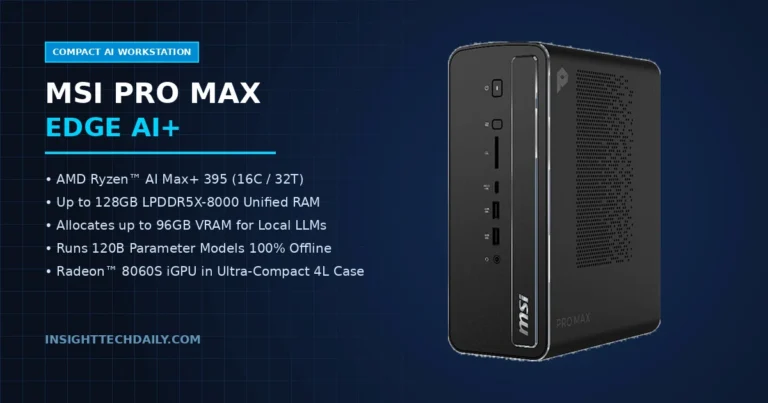
- For a compact system with substantial shared memory: a suitably configured Mac or Ryzen AI Max+ 395 system. Compare complete computers, including installed memory, storage, cooling, and software support.
2. Hardware Specifications and Price Context
Prices below are U.S. listing snapshots reviewed on September 9, 2026, before tax and any shipping charges. Indexed listings can lag behind the retailer. Confirm the exact seller, location, delivery date, and checkout price before buying.
| Hardware | Memory | Published bandwidth | Price context and buying consideration |
|---|---|---|---|
| Intel Arc Pro B60 | 24GB GDDR6 | 456 GB/s | Micro Center listing: $649.99, approximately $27.08/GB. The reviewed listing was store-specific and in-store only; do not assume nationwide availability. |
| Intel Arc Pro B65 | 32GB GDDR6 | 608 GB/s | Micro Center indexed listing: $1,099.99, approximately $34.37/GB. Live stock was not confirmed. |
| Intel Arc Pro B70 | 32GB GDDR6 | 608 GB/s | 32 Xe cores versus the B65’s 20. Obtain a current quote and compare the actual workload before paying extra. |
| AMD Radeon AI PRO R9700 | 32GB GDDR6 | 640 GB/s | Selected Newegg listings: ASRock $1,699.99 and Sapphire $1,799.99. Approximately $53.12–$56.25/GB. |
| NVIDIA GeForce RTX 5090 desktop | 32GB GDDR7 | 1,792 GB/s | Check current board pricing. High bandwidth does not make a model larger than its VRAM fit on one card. |
| NVIDIA GeForce RTX 5080 desktop | 16GB GDDR7 | 960 GB/s | Consider for workloads that fit. More bandwidth than the listed Intel cards, but less memory capacity. |
| Mac mini with M5 Pro | 24GB, 48GB, or 64GB unified memory | 307 GB/s | Price the required memory configuration. The operating system and applications share this memory with the GPU. |
| Ryzen AI Max+ 395 system | Configuration-dependent; 128GB systems exist | 256 GB/s in AMD’s AI Halo configuration | Compare complete systems. Installed RAM is not all available exclusively to the model. |
Specification sources: Intel B-series, Intel B65, AMD R9700, PNY GeForce specifications, Apple Mac mini, and AMD AI Halo.
3. Published Benchmarks: What the Sources Actually Show
These examples illustrate how software, model format, and workload affect performance. They are not a standardized ranking across all the hardware in this guide. Missing test details have not been filled in with estimates.
Intel Arc Pro B70: backend choice matters
A community report dated April 9, 2026 used a B70 connected over OCuLink PCIe 4.0 x8, Fedora Server 43, 92GB host RAM, and llama.cpp build d132f22fc. Its short synthetic tests reported:
| Model, all Q4_K_M | Backend | pp512 | tg128 |
|---|---|---|---|
| Gemma 4 31B IT | Vulkan / Mesa ANV | 218.7 | 9.22 |
| Gemma 4 31B IT | SYCL / oneAPI | 638.20 | 17.24 |
| Qwen3.5-27B | SYCL / oneAPI | 785.1 | 19.45 |
| Qwen3.5-35B-A3B | Vulkan / Mesa ANV | 869.3 | 39.4 |
These are Qwen 3.5 results, not 3.6 or 3.8. They support testing alternative backends on your chosen model; they do not establish a permanent backend winner or sustained 8K-context performance. Original community report and run details.
Two Radeon AI PRO R9700 cards: separate latency from total throughput
Puget Systems reports the following for Qwen3.6-27B FP8 on two R9700 cards, using tensor parallelism (TP=2), a bare-metal host, 500 input tokens, 200 output tokens, and 50 prompts:
| Software configuration | One user | Eight concurrent users, total |
|---|---|---|
| Stock vLLM v0.20.2 | 15.88 | 156.21 |
| Tuned vLLM build | 32.00 | 198.78 |
| Tuned vLLM with MTP speculative decoding | 62.75 | 320.23 |
The improvement from stock to the fastest configuration includes both software tuning and speculative decoding. It should not be attributed to MTP alone or advertised as single-card performance. Puget Systems’ updated test report.
Bonsai 27B: a vendor-reported result for a specialized format
PrismML reports up to 163 tokens/s on an RTX 5090 for its 1-bit Bonsai 27B variant. This is a vendor claim, not an InsightTechDaily measurement. The announcement does not establish the database’s accompanying 9,800-token/s prefill figure or an 8,192-token test context. Keep this result separate from conventional four-bit models. PrismML’s announcement.
Older NVIDIA results: useful context for multi-GPU builds
Xiongjie Dai’s published llama.cpp results provide a historical comparison for LLaMA 3 70B Q4_K_M. These are not DeepSeek or Llama 3.3 measurements:
| Hardware | Prompt evaluation, tokens/s | Generation, tokens/s |
|---|---|---|
| 2 × RTX 3090 24GB | 393.89 | 16.29 |
| 2 × RTX 4090 24GB | 905.38 | 19.06 |
These results illustrate model splitting across cards. They are not forecasts for current software, newer models, or different interconnects. Original benchmark repository and method.
4. Memory Capacity: Count More Than the Model Weights
A useful starting estimate is parameter count × bits per weight ÷ 8. For a 70-billion-parameter model at exactly four bits per weight, that is about 35GB in decimal units for weights alone. Real quantized files can be larger because they include scaling information, metadata, and tensors stored at higher precision.
For example, published Llama 3.3 70B Instruct Q4_K_M downloads are approximately 42.5GB. That exceeds a desktop RTX 5090’s 32GB before adding runtime memory. Running that file requires another arrangement, such as CPU offload or supported multi-GPU splitting; a smaller quantization is a different test. Quantization publisher’s file-size table.
Also budget for the KV cache or other model state, temporary buffers, multimodal components, and concurrent requests. Context length and cache precision affect memory consumption. There is no universal “8K context cliff” that applies to every 27B model on a 16GB GPU.
The following are planning ranges for commonly used roughly four-bit models, not fit guarantees:
- 8B–12B: Start by evaluating 12GB–16GB devices. Smaller configurations may work with shorter contexts or more aggressive compression.
- 24B–35B: Evaluate 24GB–32GB devices and check the exact file and runtime requirements.
- 70B: Evaluate 48GB–64GB or more of usable accelerator memory. A 48GB setup can still be tight; longer contexts and concurrent users need additional capacity.
Specialized models can fall well outside these ranges. PrismML’s 1-bit Bonsai 27B has a stated 3.9GB footprint. Its compression and required kernels make it a different workload from a conventional 27B four-bit model. PrismML’s release details.
Likewise, a mixture-of-experts model’s active parameter count does not describe its entire memory requirement. Check total weights and the runtime’s placement strategy. Use exact model identifiers, such as Qwen3.8-27B or Muse-Glimmer-30B, alongside the quantization and file revision.
5. Software and System Design Can Change the Best Buy
Choose the software before the card
Verify support for the exact GPU, operating system, model architecture, and quantization. “Supports AI” is not enough. llama.cpp provides multiple hardware backends and CPU/GPU hybrid inference; the backend and build you choose affect results. llama.cpp documentation.
OpenVINO, llama.cpp, and vLLM are distinct software paths. A benchmark should identify the engine and its backend rather than combine alternatives into one label. On Apple hardware, use a supported MLX model conversion or a compatible Metal-based application. EXL2 and MLX are not interchangeable format names. MLX-LM documentation.
Two cards require a supported splitting strategy
Two 32GB GPUs provide 64GB of aggregate physical VRAM, but they do not automatically behave like a single 64GB GPU. The inference engine must distribute the workload, and each device still has its own capacity limit and overhead. llama.cpp exposes explicit split modes and device settings. Documented device and split options.
Check electrical slot widths, PCIe generation, CPU-versus-chipset routing, slot spacing, power, and cooling. An x8/x8 configuration gives each card eight lanes; it does not preserve x16 bandwidth. GPU passthrough is a virtualization feature, not the mechanism that combines model memory.
Unified memory still has limits
Apple’s current Mac mini specifications list M6 and M5 Pro options; the M5 Pro model supports up to 64GB. Mac Studio lists M5 Max and M5 Ultra configurations, with substantially larger memory options. Check delivery availability separately from specifications. Mac mini specifications · Mac Studio specifications.
Shared memory can avoid a separate CPU-to-GPU copy for shared data, but it does not eliminate bandwidth limits or memory pressure. Budget for macOS or Linux and other applications, and compare the specific chip and memory configuration.
Do not confuse limited visibility with a nonexistent product
The Radeon AI PRO R9600D is a documented product, including passive designs listed by ASRock. A missing consumer retail listing does not establish a paper launch, worldwide shortage, or OEM backlog. For passive cards, confirm the chassis airflow requirements and delivery terms with the supplier. ASRock’s Radeon AI PRO lineup.
6. What a Useful Local AI Benchmark Should Show
Compare the same model and quantization at the same workload. Record prompt processing separately from token generation; also measure time to first token and total completion time for a realistic request.
A reproducible result should include:
- The model file and revision, quantization, and any vision components.
- GPU, CPU, system RAM, operating system, driver, engine version, and backend.
- Prompt length, generated length, context occupancy, cache precision, batch size, and concurrent requests.
- GPU/CPU placement, multi-GPU settings, prefix caching, and speculative decoding settings.
- Repeated measurements, memory usage, and the test commands or logs.
The llama-bench documentation distinguishes prompt-processing, generation, and combined tests. A result from a tiny prompt should not be presented as the expected speed of a long-context coding session.
7. Dan’s Hardware Buying Checklist
- Pick the workload. Name the model, quantization, context length, and number of simultaneous users.
- Confirm compatibility. Find a documented software path for the exact hardware and features you need.
- Budget memory headroom. Include weights, cache, buffers, and other applications.
- Compare relevant performance. Look for measurements that match your intended use and disclose their setup.
- Price the whole system. Include any PSU, cooling, motherboard, RAM, or chassis upgrades.
- Verify the purchase. Check the seller, exact SKU, stock location, warranty, return policy, and delivery date.
Dan’s take: Price per GB is a useful first filter. The better deal is the system that runs your chosen model reliably, responds fast enough for your work, and fits your full budget.