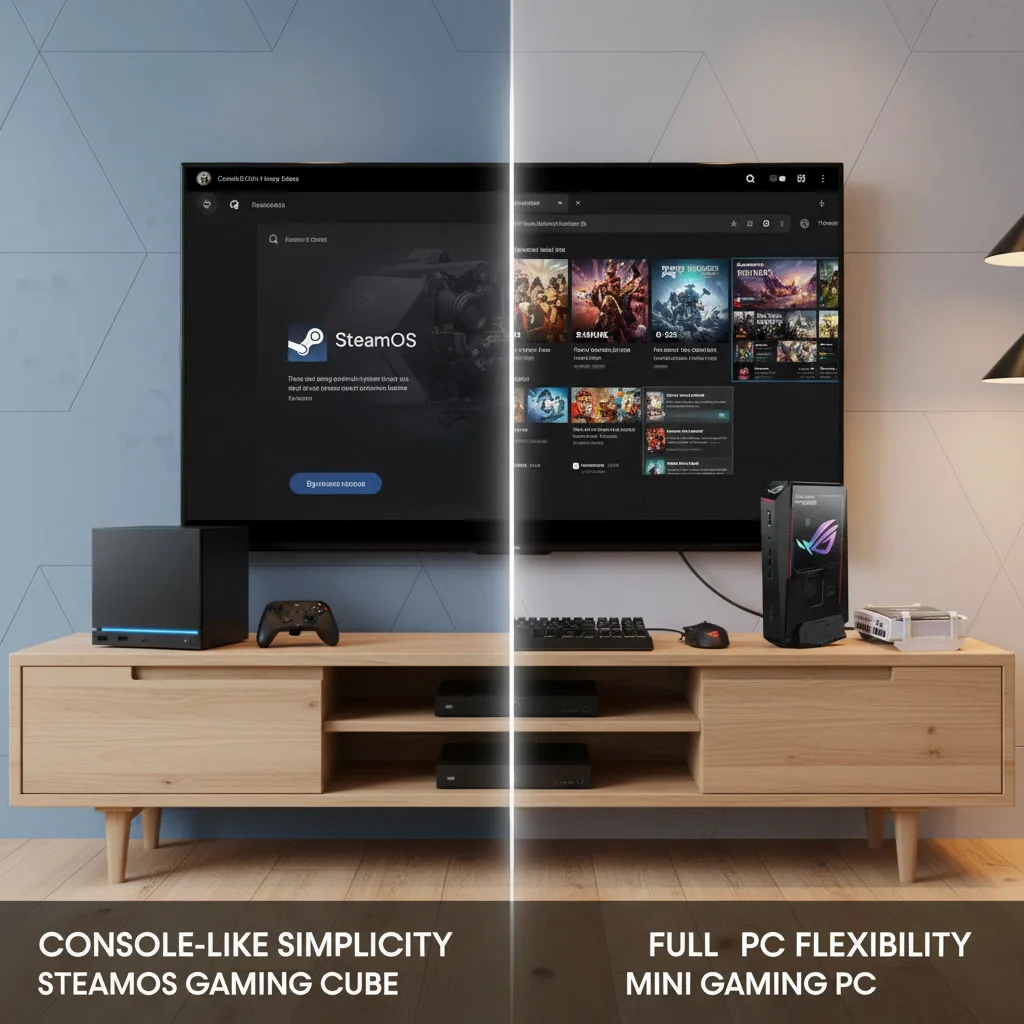
Valve’s new Steam Machine brings SteamOS back to the living room, but this time it is entering a very different market. Windows mini gaming PCs have become smaller, faster, and more flexible, creating a real choice between console-like simplicity and full PC freedom.
The living room gaming PC is having a moment. Valve’s 2026 Steam Machine has revived the idea of a compact, controller-friendly PC built specifically for the big screen. Instead of asking players to drag a desktop tower into the entertainment center or fight with Windows from the couch, Valve is offering a streamlined SteamOS box designed to feel closer to a console.
But the market around it has changed dramatically. The new Steam Machine is not competing against the old Steam Machines from a decade ago. It is competing against powerful Windows mini gaming PCs like the Asus ROG NUC 16, compact AMD systems such as the GEEKOM A9 Max, and a growing wave of small-form-factor machines that can handle gaming, productivity, emulation, streaming, and even light creative work.
That creates a very practical buying question: should you choose Valve’s SteamOS-powered living room box for the easiest couch gaming experience, or should you go with a Windows mini gaming PC for broader software support and more raw flexibility?
InsightTechDaily Take: The Steam Machine is the cleaner living room choice for players who mostly live inside Steam. A Windows mini gaming PC is the better fit for users who want PC Game Pass, Epic Games Store, broader anti-cheat support, creative apps, and more upgrade flexibility. This is less about which box is “better” and more about which kind of PC gaming life you actually want.
Valve’s 2026 Steam Machine: The Console-Like PC Returns
Valve’s new Steam Machine is best understood as a dedicated living room PC rather than a traditional console. It runs SteamOS, uses custom AMD hardware, and is designed around the same core idea that made the Steam Deck successful: make PC gaming feel less like PC maintenance.
That matters because the living room has always been a hostile place for traditional Windows PCs. A full desktop can be powerful, but using it from a couch often means dealing with pop-ups, launchers, updates, keyboard shortcuts, display scaling problems, and the occasional “why is my controller not working?” moment. Valve’s pitch is simple: boot directly into a controller-friendly Steam interface and get to your games faster.
The Pros
- A better couch interface: SteamOS is built around a controller-first experience. For users who mainly play Steam games, that makes the Steam Machine feel much closer to a PlayStation or Xbox than a traditional desktop PC.
- Steam library integration: Your Steam games, cloud saves, friends list, achievements, controller profiles, and store access are all front and center. If you already own a Steam Deck, the ecosystem handoff should feel familiar.
- Proton has matured: Valve’s Proton compatibility layer has made Linux gaming far more practical than it used to be. Many Windows games now run surprisingly well on SteamOS without the user needing to manually configure much of anything.
- Living room design: The compact cube design is easier to place near a TV than a traditional desktop tower. For buyers who care about clean entertainment-center setups, that matters.
The Cons
- The price is not console-like: With reported pricing starting at $1,049 for the 512GB model and rising to $1,349 for the 2TB model, the Steam Machine costs much more than a PlayStation 5 or Xbox Series X.
- SteamOS still has compatibility gaps: Proton is excellent, but it does not solve every problem. Some multiplayer games with aggressive anti-cheat systems remain difficult or impossible to play on Linux-based systems.
- No native PC Game Pass experience: If PC Game Pass is central to your gaming habits, Windows still has the advantage. SteamOS is built around Steam first, not Microsoft’s subscription ecosystem.
- Less general-purpose flexibility: The Steam Machine is still a PC, but its biggest strength is also its limitation: it is optimized around gaming through Steam, not around being a do-everything Windows box.
The Windows Mini Gaming PC: More Power, More Freedom, More Setup
Windows mini gaming PCs take the opposite approach. Instead of hiding the PC experience, they embrace it. Systems like the Asus ROG NUC 16 can be configured with high-end mobile-class components, including dedicated Nvidia graphics, while compact AMD systems like the GEEKOM A9 Max use powerful Ryzen AI processors and Radeon integrated graphics in a much smaller footprint.
The appeal is obvious: you get a real Windows PC in a small box. That means Steam, Epic Games Store, Battle.net, Ubisoft Connect, PC Game Pass, emulators, mods, Discord, OBS, Adobe apps, browser-based tools, productivity software, and whatever else you want to install.
The tradeoff is that Windows 11 still does not feel natural from ten feet away. It is powerful, but it is not elegant on a TV unless you put in some extra work.
The Pros
- Broader game compatibility: A Windows mini gaming PC gives you native access to Steam, Epic Games Store, PC Game Pass, and other launchers without workarounds.
- Better anti-cheat support: Games with kernel-level anti-cheat systems are generally more likely to work properly on Windows than on SteamOS.
- More raw performance options: Higher-end mini PCs with dedicated Nvidia graphics can push well beyond what a compact SteamOS box is likely to deliver, especially in ray tracing-heavy games or creative workloads.
- Real productivity use: A Windows mini PC can double as a workstation for video editing, streaming, office work, coding, AI tools, or content creation.
- Upgrade flexibility: Many mini PCs allow RAM and SSD upgrades. Some also support USB4 or Thunderbolt expansion, which can extend the system’s useful life.
The Cons
- Windows is awkward from the couch: You can make Windows work in the living room, but it usually requires a wireless keyboard, mouse, remote app, or third-party launcher like Playnite.
- More maintenance: Driver updates, launcher updates, Windows updates, background apps, and account sign-ins are all part of the experience.
- The best models get expensive fast: Budget mini PCs exist, but high-end gaming-focused models can easily climb well above traditional console pricing.
- Noise and thermals vary: Mini PCs are compact, but not all of them are quiet under gaming loads. Cooling design matters a lot in this category.
SteamOS vs Windows 11: The Real Living Room Difference
The biggest difference between the Steam Machine and a Windows mini gaming PC is not just hardware. It is the operating system.
SteamOS is built for the couch. It gets out of the way and puts your Steam library first. For a lot of players, that is exactly the point. You turn on the TV, grab a controller, pick a game, and play.
Windows 11 is built for everything else. It is more flexible, but that flexibility comes with clutter. You can run almost anything, but you also have to manage almost everything.
That is why the Steam Machine may feel better even when a Windows mini PC has stronger specs on paper. Specs matter, but so does the experience of actually using the thing every night.
Game Compatibility: Steam Library or Everything Else?
If your gaming life mostly revolves around Steam, Valve’s approach makes a lot of sense. SteamOS has become much more capable, and many popular Windows games now run well through Proton. For single-player games, indie titles, older PC games, and Steam Deck-verified titles, the Steam Machine should feel like a natural living room extension of the Steam ecosystem.
But if your library is spread across multiple storefronts, Windows has the clear compatibility advantage. PC Game Pass, Epic Games Store, Battle.net, Ubisoft Connect, EA App, and mod-heavy games are all easier to manage on Windows. Multiplayer games with strict anti-cheat requirements also remain one of the biggest reasons some players may want to stay with Windows.
That does not mean SteamOS is weak. It means SteamOS is focused. Windows is messier, but broader.
Performance Expectations: Custom AMD Hardware vs Mini PC GPUs
The Steam Machine is designed to deliver a tuned, console-like PC gaming experience in a very compact box. Valve’s advantage is optimization: SteamOS, Proton, shader caching, controller integration, and a fixed hardware target all make the system easier to support than a random pile of PC parts.
Windows mini gaming PCs vary more. A compact system with integrated Radeon 890M graphics can be excellent for lighter gaming, esports titles, emulation, media use, and everyday productivity. A higher-end ROG NUC-style machine with dedicated Nvidia graphics can move into a very different performance class, especially for demanding AAA games, ray tracing, and creative workloads.
That variety is both the strength and weakness of Windows mini PCs. You can buy exactly what you need, but you also have to understand what you are buying.
Upgradeability and Long-Term Value
Long-term value depends on what you expect the box to do.
The Steam Machine’s value comes from simplicity. It is not trying to be every kind of PC. It is trying to be a polished Steam gaming box that belongs under a TV. If Valve keeps improving SteamOS and Proton, the experience could get better over time without the user needing to think much about it.
A Windows mini gaming PC has a different kind of value. RAM and storage upgrades can extend its life, and the system can be repurposed later as a workstation, media server, emulation box, home lab machine, or compact AI PC. For users who like tinkering, that flexibility is a major advantage.
For users who hate tinkering, it may be the exact reason to avoid it.
Which Should You Buy?
The choice comes down to convenience versus capability.
Buy the Valve Steam Machine if: you want the cleanest living room gaming experience and most of your library lives on Steam. If your goal is to sit down, pick up a controller, and jump into games without managing Windows, drivers, launchers, or background clutter, Valve’s box is the more focused option.
Buy a Windows mini gaming PC if: you want maximum compatibility and flexibility. If you rely on PC Game Pass, Epic Games Store, anti-cheat-heavy multiplayer games, creative apps, streaming tools, mods, or workstation features, Windows still gives you the wider playground.
The Steam Machine is the better console-like PC. A Windows mini gaming PC is the better all-purpose PC.
Final Take: The Best Box Depends on Your Library
Valve’s new Steam Machine is not trying to replace every gaming PC. It is trying to make PC gaming feel better in the living room. That is a smart target, especially after the Steam Deck proved that players are willing to trade some flexibility for a smoother experience.
But Windows mini gaming PCs have become too capable to ignore. They may not be as elegant from the couch, but they offer more storefronts, more software freedom, more upgrade paths, and more ways to reuse the hardware later.
For Steam-first players, the Steam Machine could be the living room PC they have been waiting for. For power users, Game Pass subscribers, and tinkerers, a Windows mini gaming PC still makes more sense.
Which route are you taking for your next living room upgrade?
 |
Switch 2 Ports Confirmed After Nintendo Direct: Why Third-Party Support MattersNintendo’s June 2026 Direct helped clarify the Switch 2 launch window, confirming more third-party ports and showing why stronger hardware support could reshape Nintendo’s next console cycle. |
 |
Xbox Game Pass Financial Strains Prompt Strategic ReevaluationMicrosoft’s Game Pass strategy is facing new financial pressure as rising content costs, subscription fatigue, and day-one release expectations force a closer look at the future of Xbox’s gaming model. |