Source imagery: Intel. Featured image composite: InsightTechDaily.
High-performance mini PCs have historically came with an unavoidable compromise: rely on modest integrated graphics or move to a larger, hotter system equipped with a discrete GPU. Intel’s Core Ultra X7 358H and its Arc B390 graphics are beginning to erase some of that dividing line.
Built around Intel’s Panther Lake architecture, the Core Ultra X7 358H combines 16 CPU cores, Intel’s new Arc B390 integrated GPU, a 50-TOPS NPU, and a platform rated for up to 180 TOPS of aggregate AI performance. More importantly for compact-PC builders, the chip puts substantially more graphics capability into systems small enough to sit behind a monitor or disappear into a corner of a desk.
That does not make the discrete GPU obsolete. It does, however, change what buyers can reasonably expect from a mini PC without one.
Core Ultra X7 358H Brings Panther Lake to High-End Mini PCs
The Core Ultra X7 358H sits near the top of Intel’s Core Ultra Series 3 Panther Lake family. Intel lists the processor with 16 physical cores and 16 threads, a maximum turbo frequency of 4.8 GHz, and an Intel Arc B390 GPU.
Its CPU layout combines four Performance cores, eight Efficient cores, and four Low-Power Efficient cores. Intel continues the thread-per-core approach used in its newer mobile architectures rather than bringing Hyper-Threading back to the Performance cores.
Panther Lake is particularly significant because it represents Intel’s first client platform built around the company’s 18A manufacturing technology. Intel 18A introduces RibbonFET gate-all-around transistors alongside PowerVia backside power delivery, technologies intended to improve transistor density and power efficiency.
Intel uses a tiled architecture rather than building every subsystem on a single monolithic die, allowing CPU, graphics, I/O, and other functional blocks to be optimized independently.
That flexibility is especially useful in mini PCs, where manufacturers can tune the same processor across very different power and cooling envelopes.
Arc B390 Is the Real Headliner
As interesting as Intel 18A is from a semiconductor perspective, the biggest practical change for buyers is the integrated GPU.
The Intel Arc B390 incorporates 12 Xe3 graphics cores and can operate at up to 2.5 GHz depending on system configuration. Intel also rates the GPU for up to 122 TOPS of INT8 AI acceleration.
That makes it a substantially more capable graphics engine than Intel’s previous high-end integrated solutions.
Independent testing also shows why power configuration matters when discussing B390 performance. At a 45-watt processor power limit, testing of the Core Ultra X7 358H has produced a 3DMark Time Spy Graphics score of roughly 6,700 points. Systems with more aggressive thermal and power profiles can score higher, while thin laptops or quieter mini PCs can land below that figure.
That variability is important. Arc B390 should be viewed as a scalable integrated GPU rather than a component with one universal performance number.
1080p Gaming Without a Dedicated GPU Is Becoming Much More Practical
The larger implication is that buyers no longer have to treat integrated graphics as suitable only for desktop applications, video playback, and lightweight esports games.
With sufficient memory bandwidth and an adequately cooled implementation, Arc B390 can make 1080p gaming genuinely practical across a much wider range of modern titles.
Technologies such as Intel XeSS can extend that capability further by using image reconstruction and supported frame-generation techniques to improve perceived performance in compatible games.
That does not put every B390 system on equal footing with a dedicated gaming GPU. A discrete GPU still has advantages in sustained performance, dedicated memory bandwidth, ray-tracing workloads, driver tuning, and higher-resolution gaming.
What has changed is the threshold at which a buyer actually needs one.
For a small living-room PC, travel workstation, compact gaming machine, or general-purpose mini PC, Arc B390 may now be enough that adding a discrete GPU creates more cost, heat, and physical complexity than the workload justifies.
AI Performance Reaches 180 Platform TOPS
Panther Lake is also built around a much broader definition of AI acceleration than the NPU alone.
The Core Ultra X7 358H includes a 50-TOPS NPU designed for sustained low-power AI workloads. Intel rates the complete platform at up to 180 TOPS when CPU, GPU, and NPU acceleration are considered together.
The distinction matters because different AI applications use different processors. Background Windows AI features may target the NPU, while image generation, computer vision, or local inference software may make heavier use of the GPU.
For buyers comparing AI PCs, NPU TOPS and total platform TOPS should therefore not be treated as interchangeable measurements.
Shared Memory Could Be Particularly Useful for Local AI
One of the more interesting consequences of a powerful integrated GPU is its access to system memory.
A low-cost discrete GPU may provide considerably more graphics compute but be limited to a fixed 6GB, 8GB, or 12GB VRAM allocation. An integrated GPU instead shares the system’s main memory pool.
That does not make system RAM equivalent to dedicated VRAM. Dedicated graphics memory generally provides considerably higher bandwidth and predictable access characteristics.
But capacity can matter just as much as raw bandwidth for some local AI workloads.
A mini PC configured with 32GB or 64GB of fast LPDDR5X can potentially allocate considerably more memory to an AI model than an entry-level discrete GPU with a fixed VRAM ceiling. That may allow larger quantized models to load even when performance remains lower than it would be on a sufficiently powerful discrete GPU.
For homelab users experimenting with local inference, retrieval systems, AI agents, image processing, or lightweight development workloads, that flexibility may be one of Panther Lake’s most interesting attributes.
Core Ultra X7 358H vs. Lunar Lake, Arrow Lake-H, and Ryzen AI 9 HX 370
The specifications below help show where the 358H fits relative to several recent mobile platforms. Benchmark figures should be treated as approximate because laptop and mini-PC results can vary significantly with power limits, cooling, firmware, memory speed, and driver revisions.
| Metric / Feature | Intel Core Ultra X7 358H | Intel Core Ultra 7 258V | Intel Core Ultra 7 255H | AMD Ryzen AI 9 HX 370 |
|---|---|---|---|---|
| Architecture | Panther Lake | Lunar Lake | Arrow Lake-H | Strix Point |
| CPU Process | Intel 18A compute technology | TSMC N3B | TSMC N3B | TSMC 4nm |
| Cores / Threads | 16C / 16T 4P + 8E + 4 LP-E | 8C / 8T 4P + 4 LP-E | 16C / 16T 6P + 8E + 2 LP-E | 12C / 24T 4 Zen 5 + 8 Zen 5c |
| Integrated GPU | Intel Arc B390 12 Xe3 cores | Intel Arc 140V 8 Xe2 cores | Intel Arc 140T 8 Xe cores | Radeon 890M 16 RDNA 3.5 CUs |
| Approx. 3DMark Time Spy Graphics | ~6,700+ at 45W; higher in some configurations | ~3,900–4,200 | ~3,400–3,700 | ~3,600–3,900 |
| NPU Peak AI | 50 TOPS | 48 TOPS | 13 TOPS | 50 TOPS |
| Overall Peak AI Compute | Up to 180 TOPS | Up to 115 TOPS | Up to 96 TOPS | Up to 80 TOPS |
Benchmark results are approximate and should not be treated as direct system-to-system comparisons. Performance varies according to power limits, cooling, memory configuration, firmware, and drivers. Platform TOPS figures are manufacturer specifications and do not translate directly into application performance.
The Comparison Reveals Panther Lake’s Strength
The revised comparison makes Panther Lake’s positioning clearer.
AMD’s Ryzen AI 9 HX 370 remains a formidable CPU platform thanks to its 12-core, 24-thread Zen 5 and Zen 5c configuration. Workloads capable of keeping all 24 threads occupied can therefore behave very differently from workloads that emphasize GPU acceleration.
The Core Ultra X7 358H’s standout advantage is instead its balance. It combines a 16-core CPU with an integrated GPU that is substantially faster than the previous generation, while retaining a 50-TOPS NPU for low-power AI acceleration.
Lunar Lake remains compelling when efficiency and battery life are the primary objective, while Arrow Lake-H still offers strong conventional CPU performance. Panther Lake X-series parts are aimed at a different middle ground: enough CPU performance for serious productivity paired with unusually powerful integrated graphics.
MINISFORUM M2 Pro Shows What the Platform Can Do
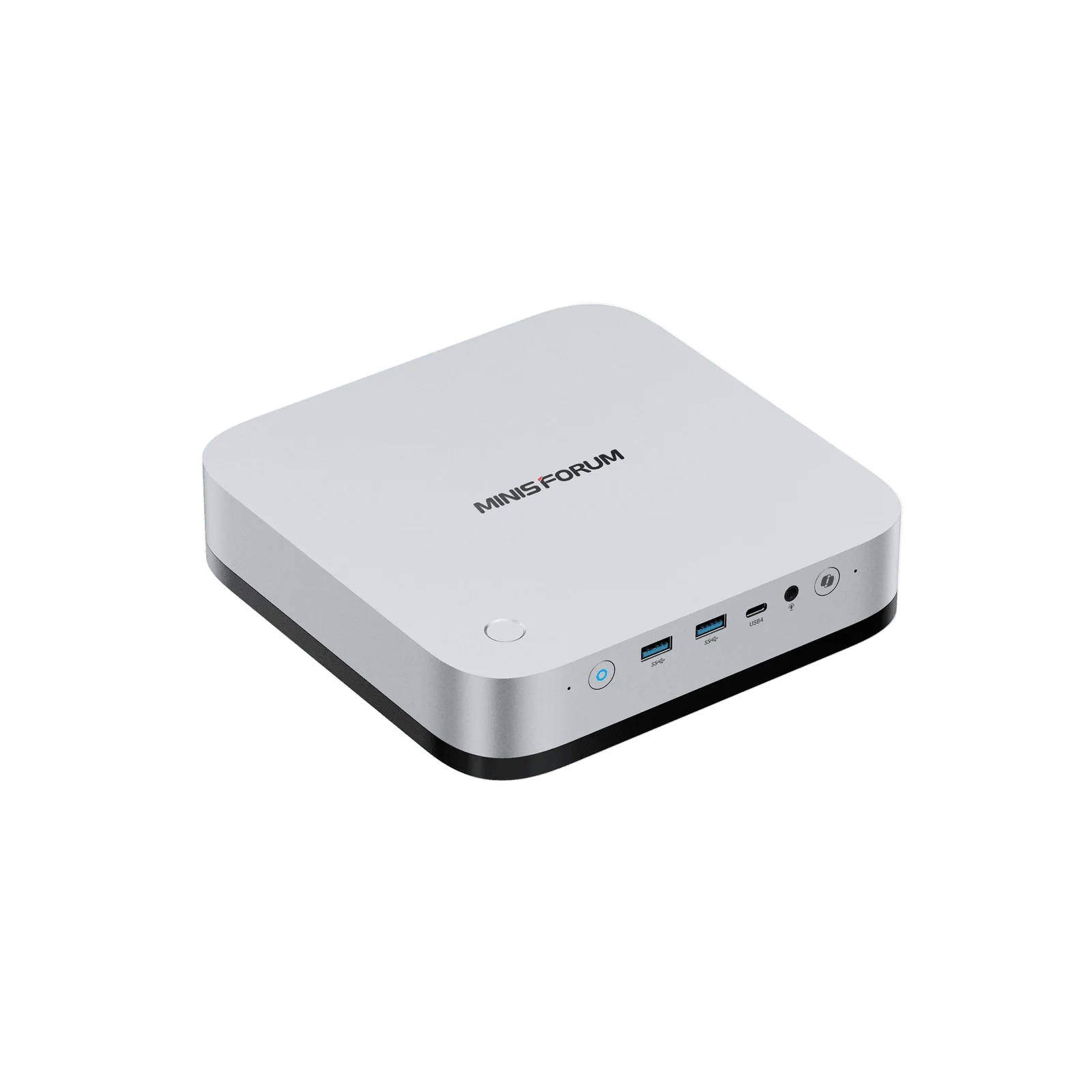
One of the more interesting implementations is the MINISFORUM M2 Pro.
The compact system pairs the Core Ultra X7 358H with onboard LPDDR5X-7467 memory and allows the processor to operate at up to 65 watts in Performance mode. MINISFORUM also integrates a 134.9-watt internal power supply, meaning the machine uses a standard AC cable instead of requiring the familiar external power brick found beside many mini PCs.
The storage and networking configuration is equally unusual for such a compact machine.
The M2 Pro provides three M.2 NVMe slots, including two PCIe 4.0 x4 connections, alongside both 10GbE and 2.5GbE Ethernet. It also includes Wi-Fi 7 and three 40Gbps USB4 connections.
That combination makes the system potentially interesting beyond ordinary desktop use. A machine with fast networking, multiple NVMe drives, 16 CPU cores, and relatively low idle consumption could serve as a compact virtualization host, development workstation, NAS-adjacent system, or local AI node.
ASUS NUC 16 Pro Takes a Different Approach
ASUS has also adopted the Core Ultra X7 358H in its NUC 16 Pro line, but its priorities are somewhat different.
The NUC measures approximately 144 × 117 × 42 mm, keeping the traditional ultra-compact NUC footprint while offering Panther Lake processors, Wi-Fi 7, dual Thunderbolt 4 connectivity, PCIe 5.0 storage support on compatible configurations, and multiple memory options.
Of particular interest is ASUS’s approach to memory. Depending on the configuration and market, the NUC 16 Pro can be offered with high-speed LPDDR5X or upgradeable DDR5/CSO-DIMM memory.
That distinction matters because it highlights one of the central trade-offs facing high-performance integrated graphics: maximum memory bandwidth and user upgradeability do not always align.
Memory Configuration Matters More Than Ever
Buyers considering an Arc B390 system should pay unusually close attention to memory.
An integrated GPU does not have its own dedicated VRAM pool. It shares system memory with the CPU, which means memory capacity and bandwidth can directly affect graphics and some compute workloads.
High-speed LPDDR5X implementations generally provide the most attractive conditions for integrated graphics, but the memory is normally soldered to the motherboard.
Socketed memory provides the opposite advantage: owners can expand capacity later, potentially extending the useful life of the machine.
That creates a real purchasing decision rather than an obvious winner.
A gaming-focused Arc B390 mini PC may benefit most from the highest-bandwidth memory configuration available. A homelab or workstation buyer expecting to expand from 32GB to 64GB or 128GB later may place considerably more value on replaceable memory.
Cooling Still Determines How Much Performance You Get
Mini PCs cannot escape physics.
Putting faster CPU and GPU hardware into a sub-two-liter chassis means sustained performance remains dependent on the cooling system and the manufacturer’s power profile.
MINISFORUM, for example, specifies Performance, Balanced, and Quiet operating modes for the M2 Pro. Its published figures show the system operating at approximately 31 dBA under full load in Balanced mode and 43.2 dBA in Performance mode under the company’s stated test conditions.
That is a useful illustration of the trade-off. Allowing Panther Lake to sustain more power can deliver additional performance, but the cooling system has to remove the resulting heat.
Two mini PCs using the same Core Ultra X7 358H should therefore not automatically be expected to perform identically.
There Is Still an Early-Adopter Premium
Panther Lake systems occupy the premium end of the mini-PC market, and that matters when evaluating them purely on performance per dollar.
A buyer who spends most of the day browsing the web, working in office applications, streaming video, or handling basic productivity tasks does not need this level of hardware.
Older Ryzen and Core Ultra mini PCs can still deliver an excellent everyday experience at substantially lower prices.
The value proposition becomes more interesting when several requirements overlap: compact dimensions, strong integrated graphics, local AI experimentation, fast networking, multiple NVMe drives, low idle consumption, or a desire to eliminate a discrete GPU.
Who Is the Core Ultra X7 358H Really For?
The Core Ultra X7 358H is most compelling when space matters but performance still does.
For compact gaming systems, Arc B390 significantly raises the level of graphics performance available without a dedicated GPU.
For content creators and developers, the combination of modern CPU cores, media engines, GPU acceleration, and a 50-TOPS NPU creates a flexible workstation platform.
For local AI enthusiasts, large shared-memory configurations create opportunities that small discrete GPUs with fixed VRAM pools sometimes cannot offer, even though a powerful dedicated GPU remains the better choice when raw inference or generation speed is the priority.
And for homelab users, systems such as the MINISFORUM M2 Pro show how Panther Lake can be combined with 10GbE networking and multiple NVMe drives to create unusually dense compute nodes.
InsightTechDaily Analysis: The Mini PC Is Becoming a Different Class of Machine
The most important thing about the Intel Core Ultra X7 358H may not be any individual benchmark result.
It is what the processor allows manufacturers to build.
The traditional mini PC was largely a space-saving desktop: inexpensive, efficient, and convenient, but normally several steps behind a full-sized machine whenever graphics-intensive work entered the equation.
Arc B390 narrows that gap considerably.
It does not eliminate the advantages of dedicated graphics, nor does Panther Lake suddenly turn a tiny computer into a replacement for every gaming tower or GPU workstation. High-end gaming, heavy GPU rendering, large-scale AI inference, and other sustained accelerator workloads still favor dedicated hardware.
But the point at which buyers need that hardware has moved.
A single compact system can now credibly handle everyday productivity, software development, 1080p gaming, media work, AI-assisted applications, and homelab duties without requiring a separate graphics card.
That makes the Core Ultra X7 358H less interesting as merely another processor generation and more interesting as evidence of where compact computing is heading.
The mini PC is no longer defined primarily by what had to be removed to make the computer small. With Panther Lake and Arc B390, the conversation is increasingly about how much hardware can fit inside one.