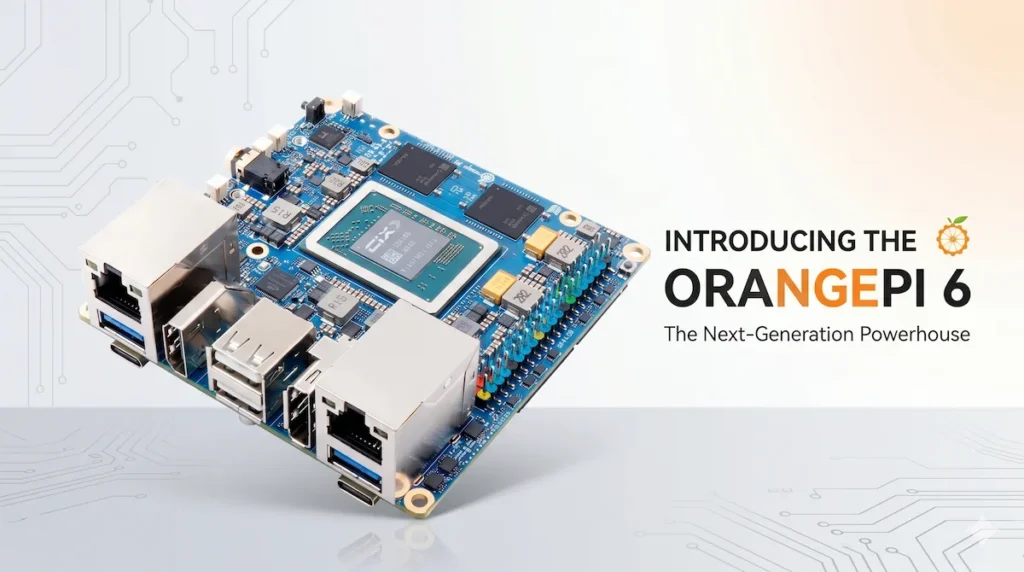
If you thought single-board computers were just for hobbyists, the Orange Pi 6 might change your mind. Is the juice worth the squeeze?
The Hardware: Numbers That Demand Attention
The Orange Pi 6 isn’t your typical Raspberry Pi competitor—it’s a performance-focused board designed for users who need network throughput, compute power, and serious expansion options. Here’s what stands out:
- Processor: Powered by the CIX CD8180 (CiXin P1) processor, a 12-core 64-bit CPU layout. For context, the Raspberry Pi 5’s Broadcom BCM2712 relies on an older quad-core setup. The Orange Pi 6 blows past it on raw multi-tasking density.
- Memory: Configurable with ultra-fast 128-bit channel 8GB, 16GB, or 24GB LPDDR5 memory configurations running at a blistering 6,400 MT/s.
- Storage: A microSD slot plus dual (x2) M.2 Key-M 2280 slots for NVMe SSDs running over PCIe 4.0 x4. Having two full-sized slots is an absolute game-changer for high-speed caching and large-scale local storage pools.
- Networking: Dual 2.5GbE Ethernet ports come natively onboard. This is a win for building custom high-bandwidth firewalls, multi-WAN edge nodes, or local NAS backbones.
- AI Acceleration: Delivers up to 45 TOPS of total combined AI computing power across the system (CPU+NPU+GPU), with the dedicated onboard NPU alone contributing a massive 28.8 TOPS. The dedicated NPU gives developers a promising local AI target for optimized edge workloads, vision models, and smaller on-device inference tasks, though real-world LLM usefulness will depend heavily on drivers, frameworks, quantization support, and community tooling.
- Cooling & Power: No heatsink included. The board relies on a dual Type-C PD 20V power interface compatible with 65W/100W power bricks. With that much juice flowing through a tight 90 x 90mm footprint, active cooling via the onboard PWM fan header is non-negotiable.
Who’s This For?
On paper, the Orange Pi 6 targets several high-performance niches:
- Network Engineers: Dual native 2.5GbE ports make it ideal for bare-metal routing platforms, custom firewalls, or high-throughput network nodes without dealing with unstable USB network dongles.
- Edge-Compute & Homelabs: If you’re looking to run dense Docker containers, compile software packages, or spin up virtualization layers, the combination of 12 cores, dual NVMe arrays, and up to 24GB of LPDDR5 is unrivaled in this class.
- AI & Robotics Developers: With a 28.8 TOPS dedicated NPU and hardware-accelerated ray tracing on the GPU, on-device inference, robotics workloads, computer vision experiments, and AI pipeline testing are realistic targets, though developers should expect a steep toolchain learning curve.
The Catch: Software and Support
Here’s where Orange Pi’s reputation for specs-over-execution might bite users:
- Early-Adopter OS Support: While official sheets list support for everything from Ubuntu, Debian, and Android to Windows and OpenHarmony, historical launches show that early kernel integrations for brand-new silicon architectures can be spotty.
- GPIO Chaos: Orange Pi’s 40-pin GPIO layouts don’t always align cleanly drop-in with ecosystem accessories. If you’re porting a project from a standard Raspberry Pi development pipeline, look closely at the pin definitions first.
- Thermal Dice Roll: Pulling desktop-class features into an SBC format means massive heat generation. Skipping a bundled cooling block is an oversight; if you push this board hard without active cooling, sustained workloads are likely to expose throttling quickly, especially if the CPU, GPU, NPU, and NVMe storage are all under load.
Comparing to Alternatives
How does the Orange Pi 6 stack up?
| Board | Cores | Max RAM | Ethernet | PCIe | NPU/Accelerators |
|---|---|---|---|---|---|
| Orange Pi 6 | 12 (CIX CD8180 Layout) | 24GB LPDDR5 | 2x 2.5 GbE | PCIe 4.0 (Dual M.2) | 28.8 TOPS NPU (45 Total) |
| Raspberry Pi 5 | 4 (A76) | 16GB LPDDR4X | 1x 1 GbE | PCIe 2.0 x1 | None (Requires HAT) |
| Radxa Rock 5B | 8 (A76/A55) | 16GB LPDDR5 | 1x 2.5 GbE | PCIe 3.0 x4 | 6 TOPS NPU |
| ODROID-N2+ | 6 (A73/A53) | 4GB LPDDR4 | 1x 1 GbE | None | None |
Key Takeaway: The Orange Pi 6 wins on spec sheet, but only if you’re okay with early-adopter pains. The Raspberry Pi 5 is still the safe bet for beginners, while the Radxa Rock 5B splits the difference with better software support.
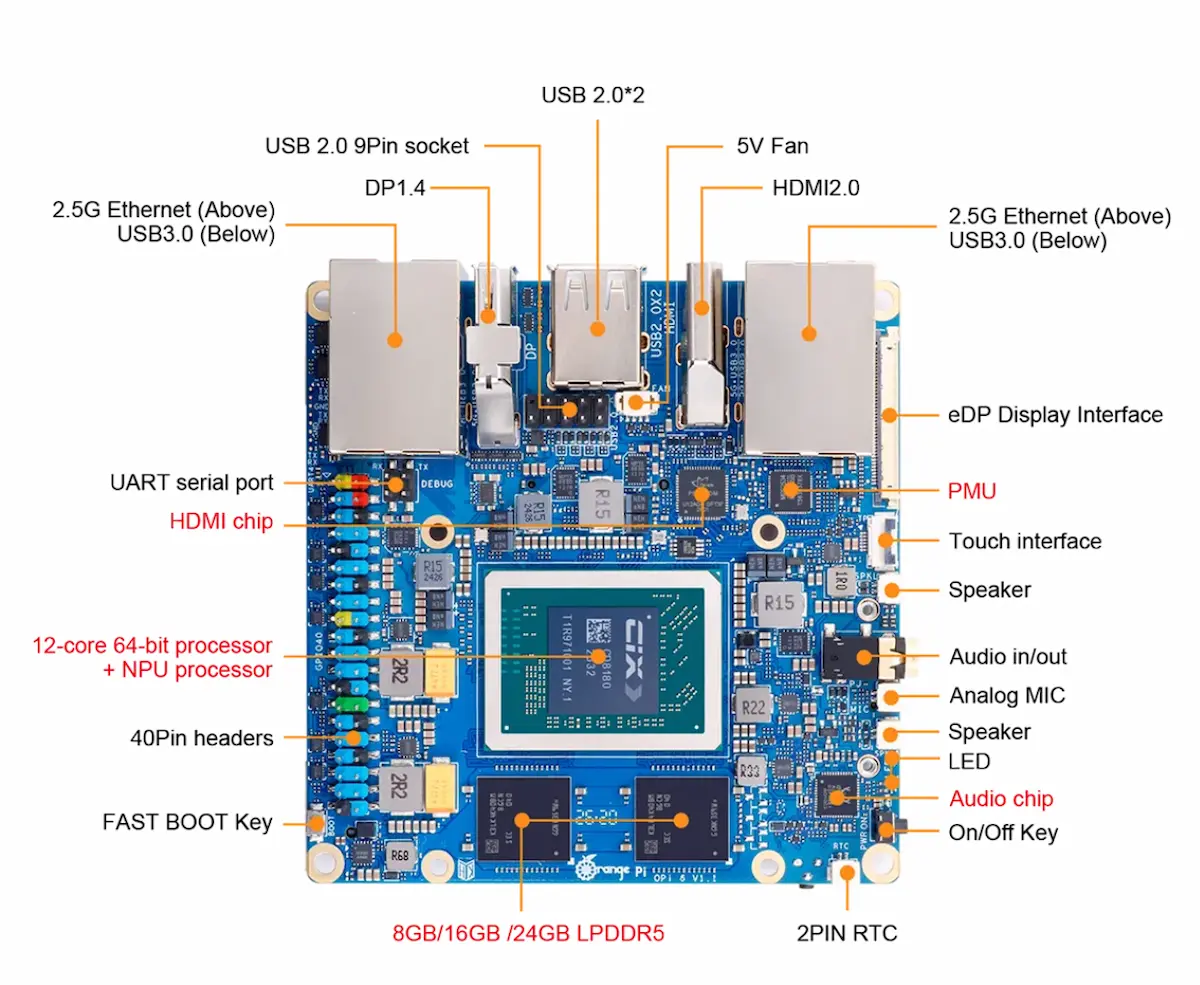
Image Credit: Orange Pi
Real-World Performance: What to Expect
Until third-party benchmarks emerge, we’re left with Orange Pi’s claims and the architecture’s track record:
- Multi-Threaded Workloads: The 12-core array should absolutely excel at deep code compilation, home automation logic execution, or handling concurrent network services. It should have enough headroom for multiple background services, storage tasks, and container workloads, though media transcoding performance will depend heavily on codec support and software acceleration.
- Network Throughput: Dual native 2.5GbE connections open meaningful internal bandwidth for homelabs, routing projects, and fast LAN transfers. A typical residential internet connection may not fully use that headroom, but local storage, firewall, and multi-node setups can benefit from the extra ports.
- PCIe Bandwidth: With dual slots scaling up to Gen 4 speeds, you’re looking at massive raw throughput potential—perfect for setting up high-performance cache networks or micro NVMe storage servers.
- Thermals: Under sustained processing load, throttling is a real concern without active cooling. Budgeting for an aftermarket cooler or fan setup should be treated as part of the build, not an optional upgrade.
Benchmarks That Matter (When They Arrive)
Once community testing kicks in, watch for:
- Geekbench 6: How does the 12-core multi-core environment stack up directly against entry-level x86 mini PCs?
- OpenSSL Speed: Critical for VPN encryption and firewall processing overhead (WireGuard / OpenVPN throughput over those 2.5GbE lines).
- NVMe iozone: Figuring out real-world storage controller stability when running dual Gen 4 SSD drives simultaneously.
- NPU Demo: Determining how effectively developer frameworks like ONNX Runtime tap into the 28.8 TOPS dedicated NPU chip block.
ITD Insight
ITD Insight
The Orange Pi 6 is exactly the kind of board that makes homelab builders stop scrolling. Dual 2.5GbE, dual NVMe, a 12-core Arm processor, and a large claimed AI compute pool give it a spec sheet that looks closer to a compact edge server than a traditional hobbyist SBC.
But this is also where the buyer needs to slow down. Raspberry Pi’s biggest advantage has never been raw hardware alone; it has been documentation, community support, accessories, and predictable software behavior. Orange Pi 6 may win the spec-sheet fight, but it still has to prove itself in driver support, thermal behavior, OS polish, and long-term updates.
For experienced users, that trade-off may be worth it. For beginners, the safer path is probably still the Raspberry Pi or a low-cost mini PC.
Bottom Line
The Orange Pi 6 is a high-risk, high-reward proposition. If you need stellar multi-gigabit LAN performance, a massive 45 TOPS total AI engine pool, and dual expandable PCIe 4.0 NVMe options on a budget, it’s an incredibly compelling board—assuming you’re willing to wrestle with early software optimization cycles and high cooling demands. For the average builder, a Raspberry Pi 5 remains the safer path for seamless out-of-the-box compatibility. But for custom firewalls, home lab expansion, and specialized server implementations, the Orange Pi 6 is a gamble worth taking if you’re ready to get your hands dirty.
RELATED READING:
 |
GPD Box Panther Lake Mini PC: PCIe 5.0 Expansion & PerformanceA deep dive into GPD’s upcoming Panther Lake powerhouse and its massive expansion capabilities. |
 |
Raspberry Pi vs. Mini PC (2026): Which Should You Buy?Stacking up the latest single-board computers against budget mini PCs for homelabs. |
 |
Dual-LAN Mini PCs: Hidden Gems for Homelabs & RoutersA look at multi-Ethernet mini PCs that can make strong custom firewalls and network nodes. |