Not all computers are built for the same job—and in the world of DIY networking and home labs, one size definitely does not fit all.
While most buyers focus on raw performance or price, a growing segment of users is looking for something different: small, efficient systems with multiple network ports. That’s where dual LAN Mini PCs come in—and why Deal Hunter Dan is calling them some of the most overlooked “hidden gems” in today’s PC market.
These compact systems sit in a unique middle ground between Raspberry Pi-style boards and full desktops, offering just enough power, flexibility, and connectivity to run serious workloads—without the cost or complexity of traditional servers.
Dual LAN Mini PCs are quietly becoming the backbone of DIY infrastructure. As more users run local AI tools, home servers, and containerized apps, network flexibility—not just CPU performance—is becoming the real bottleneck.
Why Dual LAN Matters More Than You Think
Most consumer PCs ship with a single Ethernet port—or none at all. But dual LAN changes how a system can be used:
- Router/Firewall builds: Separate WAN and LAN traffic for pfSense or OPNsense
- Network segmentation: Isolate devices or services for security
- Virtualization: Assign dedicated network interfaces to VMs
- Link aggregation: Combine bandwidth for higher throughput (in supported setups)
This turns a simple Mini PC into something much closer to a dedicated network appliance.
The Hidden Gems: Deal Hunter Dan’s Picks
The Home Lab Workhorse
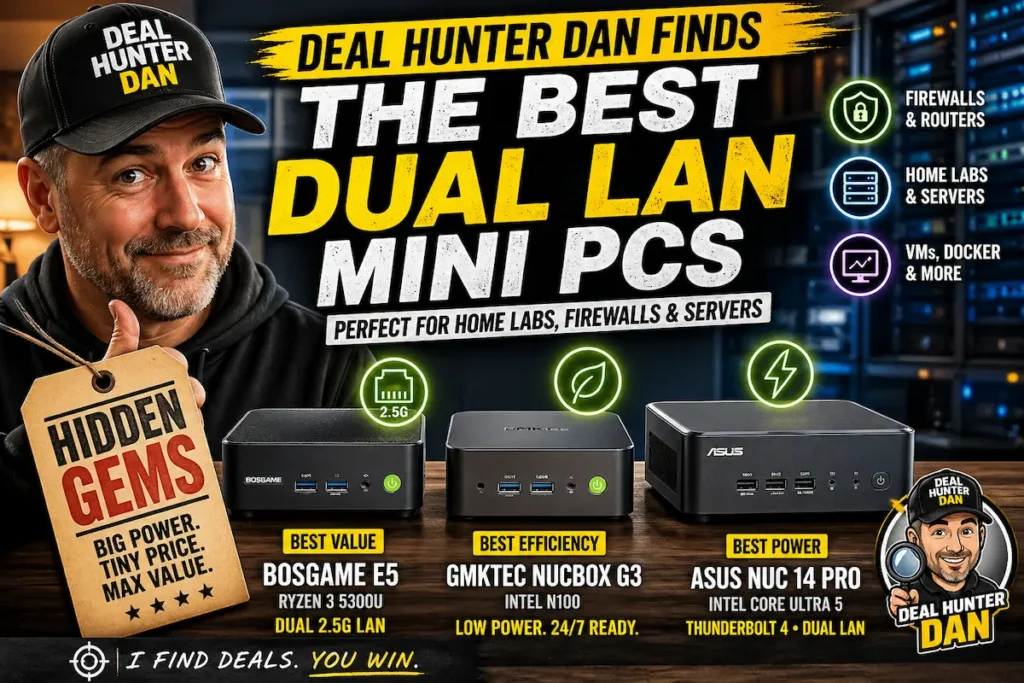
BOSGAME E5 (Ryzen 3 5300U)
This is where value meets capability. The BOSGAME E5 stands out by offering dual 2.5GbE LAN ports—a feature still rare in budget Mini PCs.
- CPU: AMD Ryzen 3 5300U (4C/8T)
- RAM: 16GB
- Storage: 512GB SSD
- Networking: Dual 2.5G Ethernet
Why it’s a hidden gem:
It hits a sweet spot for Proxmox, Docker, or lightweight virtualization. You get enough CPU headroom to run multiple services while the faster LAN ports enable real network throughput—not just theoretical performance.
The Ultra-Efficient Firewall Box
GMKtec NucBox G3 (Intel N100)
This tiny system is easy to overlook—but in the right configuration, it becomes one of the most efficient network appliances you can build.
- CPU: Intel N100 (Alder Lake-N, ~6W TDP)
- RAM: 8GB–16GB
- Cooling: Near-silent / low power
Why it’s a hidden gem:
The N100 is built for efficiency. Running 24/7 as a firewall, VPN gateway, or DNS server barely impacts power usage—making it ideal for always-on infrastructure.
For users building pfSense or OPNsense routers, this class of device is often more practical than repurposing old desktops.
The Premium Networking Hub
ASUS NUC 14 Pro (Intel Core Ultra)
At the high end, the ASUS NUC 14 Pro brings enterprise-level features into the Mini PC space.
- CPU: Intel Core Ultra 5
- Graphics: Intel Arc iGPU
- Expansion: Thunderbolt 4
Why it’s a hidden gem:
It combines dual networking with high-end compute and expansion. With Thunderbolt, you can attach high-speed storage or even external networking solutions—making it a scalable platform for serious workloads.
Mini PC vs Raspberry Pi vs Desktop: Where These Fit
Dual LAN Mini PCs are filling a gap that didn’t really exist a few years ago:
- Vs Raspberry Pi: Far more CPU power and native Ethernet performance
- Vs Desktop PCs: Lower power draw, smaller footprint, always-on friendly
- Vs Enterprise gear: Much cheaper and easier to deploy
This makes them ideal for:
- Home labs (Proxmox, Docker, Kubernetes)
- Network routing and firewalls
- NAS and media servers
- Edge AI or local inference nodes
What This Means for Buyers
“Hidden gem” isn’t just about price—it’s about capability per watt and per dollar.
Dual LAN Mini PCs offer a level of flexibility that most mainstream buyers never consider—but once you need it, nothing else really replaces it.
As networking speeds increase and more workloads move local (from media servers to AI tools), systems like these are becoming less niche—and more like the foundation of a modern home tech stack.
What to Look for Before You Buy
- LAN speed: Prefer 2.5GbE over standard Gigabit if possible
- CPU class: N100 for efficiency, Ryzen/Ultra for heavier workloads
- Cooling design: Fanless vs active impacts noise and thermals
- Upgradeability: RAM and storage access matter long-term
As AI workloads and home servers grow, the next bottleneck isn’t always compute—it’s networking. Systems with multiple high-speed NICs may age better than those with faster CPUs but limited connectivity.
The Bottom Line
Dual LAN Mini PCs are one of the most underrated segments in the PC market right now. They’re not flashy, and they’re rarely marketed aggressively—but for the right user, they unlock capabilities that standard desktops and single-board computers simply can’t match.
For Deal Hunter Dan, that’s the definition of a true hidden gem.
Want to go deeper? Check out our related guides: