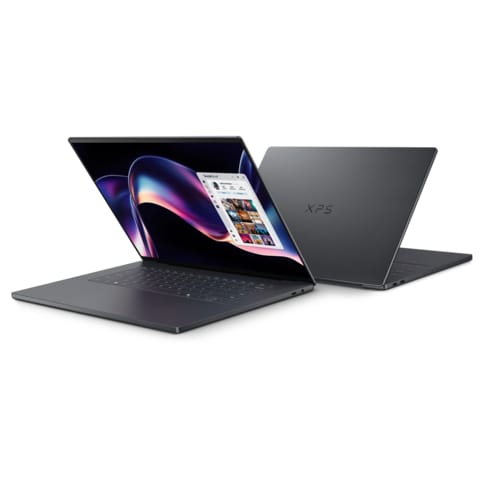
Image credit: Dell
After several years of bold—sometimes divisive—design experimentation, Dell appears to be recalibrating its flagship laptop strategy. The 2026 XPS 14 (DA14260) and XPS 16 (DA16260) signal what many longtime users will view as a welcome course correction: the return of physical function keys, the restoration of XPS branding on the lid, and a more balanced approach to performance, portability, and usability.
At the same time, these systems are not a nostalgic rollback. Both models integrate Intel’s latest “Panther Lake” Core Ultra Series 3 processors, bringing meaningful gains in efficiency and integrated graphics—an increasingly important battleground in the modern AI PC era.
Related coverage on InsightTechDaily:
Battle of the APUs: AMD’s Strix Halo vs. Intel’s Panther Lake •
Intel hires Eric Demers: what it signals for Intel’s GPU strategy •
Apple vs. AMD unified memory: what matters for AI PCs in 2026
A Design Reset That Prioritizes Usability
Physical Function Keys Replace the Haptic Row
Perhaps the most consequential change is the removal of the capacitive, haptic function row introduced in previous XPS generations. While visually striking, the touch-sensitive strip drew consistent criticism for lack of tactile feedback and inconsistent responsiveness in professional workflows.
For 2026, Dell has restored full-size physical function keys. For developers, editors, and power users who rely on shortcut-heavy workflows, tactile confirmation improves both speed and accuracy. Physical keys also simplify BIOS access, troubleshooting, and accessibility use cases—areas where haptic implementations often fall short.
XPS Branding Returns to the Lid
Dell has also brought back visible XPS branding on the exterior. While subtle, this adjustment reinforces product identity and clarifies positioning within Dell’s broader lineup. Symbolically, it suggests the XPS line is no longer experimenting with identity—it’s reaffirming it.
Chassis and Build: Thinner, Lighter, More Refined
Both models measure 14.6mm thin, placing them among the slimmest premium productivity laptops in their size class. The chassis continues to use CNC-machined aluminum, maintaining structural rigidity while keeping weight in check. Dell also appears to have refined internal layout and weight distribution for better lap balance and reduced flex in the keyboard deck.
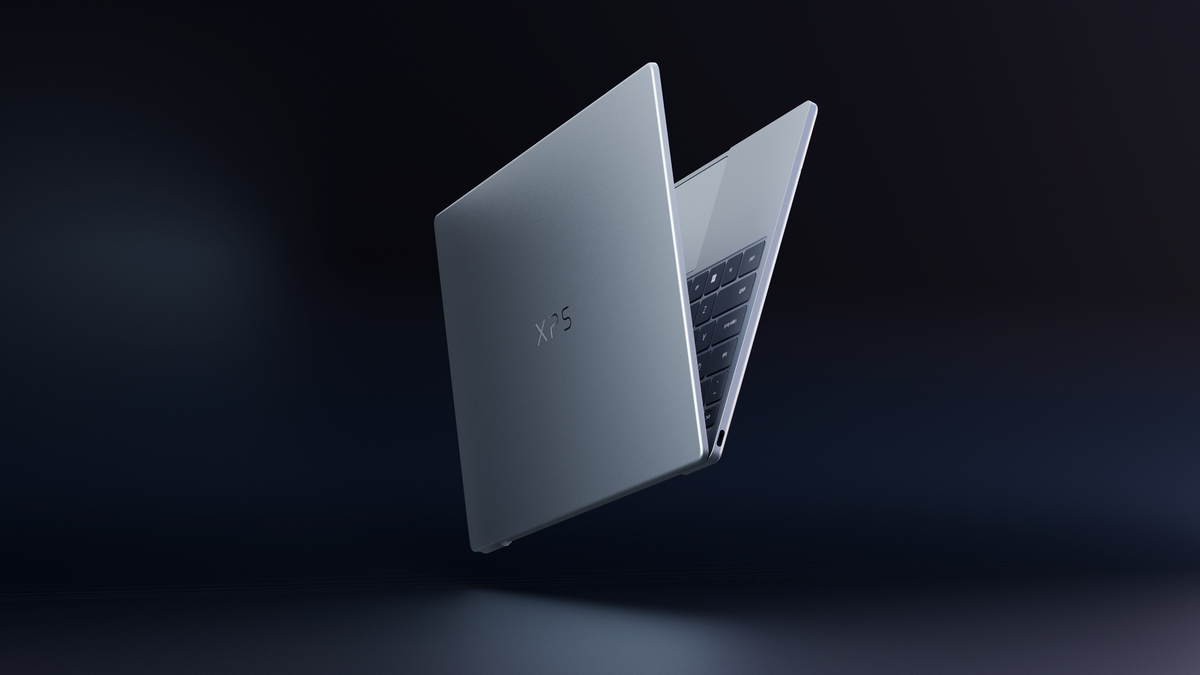
Official Dell press image of the 2026 XPS 13. Image credit: Dell
The floating profile shot above highlights Dell’s refreshed XPS 13 design language — a minimalist aluminum chassis with refined edges and precision machining that underscores the brand’s renewed focus on build quality and everyday productivity. While the XPS 13 wasn’t the focal point of this 2026 refresh, its inclusion hints at Dell’s broader intentions to unify the XPS family’s visual identity across sizes and use cases.
This image also visually reinforces the narrative that Dell is returning to its roots: established design cues, premium materials, and practical ergonomics that align with the expectations of professionals and creators alike. As independent reviews roll in, we’ll be watching whether the XPS 13’s refinement translates into real-world comfort and durability alongside the 14- and 16-inch models.
Subtle Improvements to the Glass Touchpad
The seamless glass touchpad remains visually integrated into the palm rest, but Dell has added subtle etching to help users locate the active area by feel. This addresses a key usability complaint without abandoning the clean, borderless design language.
Quick Comparison: XPS 14 vs. XPS 16 (2026)
| Feature | XPS 14 (2026) | XPS 16 (2026) |
|---|---|---|
| Thickness | 14.6mm | 14.6mm |
| Thermal Headroom | Up to ~25W sustained | Up to ~35W sustained |
| Display Size | 14.5-inch | 16.3-inch |
| OLED Option | 2.8K Tandem OLED | 3.2K Tandem OLED |
| Ports | 3× Thunderbolt 4, 3.5mm | 3× Thunderbolt 4, 3.5mm, microSD |
Panther Lake and the Rise of Stronger Integrated Graphics
Core Ultra Series 3: What’s New
The 2026 XPS 14 and XPS 16 adopt Intel’s Panther Lake Core Ultra Series 3 processors. While final platform details will be validated through independent reviews, the key story for many buyers is the step forward in integrated GPU capability—plus improved efficiency that supports longer runtime in thin-and-light chassis designs.
On the broader market level, this dovetails with two trends reshaping premium laptops: (1) integrated graphics are becoming “good enough” for more creative workloads, and (2) AI PC positioning is increasingly tied to on-device acceleration and power efficiency. (For a wider architecture view, see our unified memory and AI PC coverage linked above.)
Integrated Graphics That Matter for Creators
The upgraded Intel Arc integrated graphics aim to close more of the gap for workloads that used to require discrete GPUs, including:
- 4K video editing timelines
- RAW photo batch processing
- Light 3D work
- GPU-accelerated AI tasks (select workflows)
These machines are not a replacement for high-end discrete GPUs in heavy 3D or advanced rendering pipelines. But the broader implication is important: the “thin-and-light” category is steadily expanding what it can accomplish without dedicated graphics hardware.
Display Options: OLED and IPS Across Both Sizes
Both models offer IPS LCD and Tandem OLED options, with size and resolution differences:
- XPS 14 (14.5-inch): 2K IPS LCD or 2.8K Tandem OLED
- XPS 16 (16.3-inch): 2K IPS LCD or 3.2K Tandem OLED
For buyers prioritizing battery life, the 2K LCD configurations are typically the endurance leaders. For creative professionals who value contrast and color, OLED delivers stronger visual fidelity—often at a cost to runtime depending on workload, brightness, and content.
Battery Life and Sustained Performance
Battery Claims: Efficiency Gains Show the Most on LCD Models
Dell is positioning battery endurance as a major pillar of the refresh, especially in LCD configurations. Real-world results will vary based on workload, brightness, and connectivity, but the combination of efficiency improvements and thermal tuning is clearly part of the platform story.
Sustained Power Limits: Where the XPS 16 Separates
Although both models share design language and processor family, the XPS 16 has a larger thermal envelope. That translates into a key practical distinction:
- XPS 14: up to ~25W sustained power
- XPS 16: up to ~35W sustained power
In short bursts, performance may look similar. Over longer workloads—renders, code compilation, exports—the XPS 16’s higher sustained wattage can maintain stronger throughput. If your workflow includes extended compute-heavy tasks, the 16-inch chassis size often translates directly into measurable performance stability.
Camera and Audio: Competitive for Hybrid Work
Dell includes an 8MP / 4K webcam and a 10W quad-speaker system with Dolby Atmos support. In a premium segment where many competitors still ship 1080p webcams, a stronger camera pipeline is a meaningful quality-of-life advantage for daily calls and remote work.
Ports: Minimalist, with One Strategic Return
Connectivity remains streamlined with 3× Thunderbolt 4 and a 3.5mm headphone jack. The XPS 16 restores a microSD slot, while the XPS 14 does not include one—an important difference for photographers and creators who still rely on removable media workflows.
XPS 14 vs. XPS 16: Which Should You Buy?
Choose the XPS 14 If You Prioritize
- Portability and travel-friendly weight
- Maximum battery life potential (especially LCD)
- Strong performance in a compact form
Choose the XPS 16 If You Need
- Larger screen real estate
- Higher sustained performance and thermal headroom
- microSD convenience for creator workflows
Strategic Implications for the XPS Line
The 2026 refresh suggests Dell is leaning into three themes: usability over experimentation, integrated graphics maturity, and efficiency as a competitive differentiator. The removal of the haptic function row is the clearest signal that Dell heard professional user feedback—an important step in regaining trust in a premium category where small usability decisions can determine long-term loyalty.
What Remains Unclear (What Reviews Must Prove)
- Real-world thermal behavior under extended GPU load
- OLED battery impact compared to LCD configurations
- Noise levels at peak sustained wattage
- Long-term durability and feel of the etched glass touchpad
Final Assessment
The 2026 Dell XPS 14 and XPS 16 represent a calculated strategic recalibration rather than a reinvention. By restoring physical function keys, refining the touchpad experience, and leaning into Intel’s Panther Lake platform, Dell is positioning XPS as a premium line that feels modern without sacrificing practical ergonomics.
The XPS 14 stands out for mobility and endurance. The XPS 16 differentiates itself with thermal headroom, screen space, and the return of microSD.
For buyers who hesitated over prior-generation input changes, this refresh may feel less like a routine upgrade cycle—and more like a course correction.
FAQ
Do the 2026 XPS models really bring back physical function keys?
Yes—this refresh emphasizes a return to traditional tactile function keys, addressing a major usability complaint from prior generations.
Is XPS 14 or XPS 16 better for creators?
If your creator work involves sustained exports, renders, or longer compute loads, the XPS 16’s larger thermal envelope is typically the safer choice. If you prioritize travel and battery life, the XPS 14 is the better mobility pick.
Is OLED worth it on these models?
OLED can be a strong choice for contrast and color-focused work, but it may reduce battery life depending on brightness and content. LCD configurations are usually the endurance leaders.