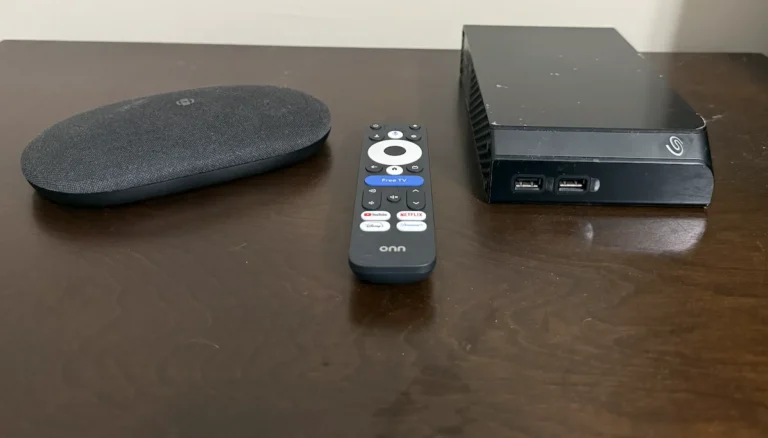
My Onn 4K Pro review covers one week of streaming on an older Samsung TV. Faster apps and a better Spectrum experience make the $59.98 purchase feel worthwhile, although the default Google TV home screen is cluttered.
Switching between streaming apps had become frustrating on my Samsung television. Apps sometimes froze or got stuck, and moving between services, loading guides and finding something to watch could feel sluggish.
I bought the Onn 4K Pro at Walmart for $59.98 to see whether a dedicated streaming device would help. Until then, I had relied entirely on the apps built into my TV. I looked at some of the more expensive devices before purchasing the Onn 4K Pro but the price to hardware value of this box was the biggest draw for me and that may be its biggest strength.
My Setup and Why I Bought the Onn 4K Pro
I’m using the Onn with a Samsung QN55Q60AAFXZA television and a Samsung soundbar connected through HDMI. My regular streaming services include Netflix, Disney+, Prime Video, Tubi and Spectrum.
The Onn connects over Wi-Fi, and the connection has been fast and stable during my first week. It sits fairly close to the wireless connection point, so I haven’t tested its performance at longer distances.
My immediate reason for buying a streaming device was mainly sluggish app performance on my TV. I also wanted to explore playing media from my PC on to the television, casting from other devices, possibly streaming retro games and integrating the TV with my homelab. An HDHomeRun for distributing over-the-air television around the house is another intriguing possibility for me.
Those projects are still ahead of me. This review focuses on the standard interface and the streaming apps I’ve actually used.

Setup Was Straightforward
I used the standard setup process and found it fairly straightforward and easy.
I considered installing Projectivy Launcher, but wanted to understand the default interface and features before changing anything. The standard configuration remains the basis for these first-week impressions.
Faster Apps Are the Biggest Improvement
The clearest difference is responsiveness. Apps feel snappier, switching between services is faster, and I’m encountering few to no instances of apps freezing or getting stuck like they previously did on my TV.
Spectrum Has Been a Standout
The Spectrum app has been a big improvement over using Spectrum directly on the Samsung TV. That matters because loading guides and moving between content are regular parts of how I watch television.
With Netflix, Disney+, Prime Video, Tubi and Spectrum in rotation, I have spent plenty of time switching between apps and the Onn has made that process feel quick and smooth.
These are not timed benchmarks just everyday observations about my personal user experience. I did not isolate what caused the Samsung’s slowdowns though the TV is showing its age at this point. Moving my streaming activity to the Onn has noticeably improved my experience.
The Default Home Screen Is Cluttered
The home screen is my main complaint so far. There is a lot on it, and the clutter is enough to be an issue.
I can understand why people use alternatives such as Projectivy Launcher. I’m not ready to give up the default interface yet, because I still want time to learn what it offers. Even so, I would welcome a cleaner layout.
Picture and Sound: More Modest Changes
Colors seem a little brighter to me, and the image sometimes looks slightly crisper through the Onn. That is a subjective viewing impression rather than a measured improvement in picture accuracy or detail.
Sound has remained broadly similar through my HDMI-connected Samsung soundbar. I haven’t noticed a major audio difference, and I’m not evaluating the device with a full surround-sound system.
Remote Control and Connections
My Samsung remote already controls both the television and the Onn, which has made the transition easier.
I’m still evaluating whether the included Onn remote can handle everything I need, including television power and soundbar volume. I haven’t settled on a single-remote arrangement yet.

Apps, Storage and Future Homelab Projects
The Google Play Store’s selection seems extensive, and storage has felt comfortable for my current app needs. Walmart lists the Onn 4K Pro with 3GB of RAM and 32GB of storage; the advertised storage capacity includes space used by the system.
The PC-to-TV and homelab possibilities are part of why I wanted to try a dedicated streaming device. Media playback, casting, retro-game streaming and a possible HDHomeRun setup could each become follow-up projects once I’ve tested them.
Value Is the Strongest Selling Point
The best part of the Onn 4K Pro, for me, is its value. At the $59.98 I paid, it has addressed a frustrating part of using the television I already own.
That price feels especially welcome against a backdrop of pressure on memory costs. TrendForce’s September outlook forecast further increases in DRAM and NAND contract prices. That forecast doesn’t establish a future retail price for the Onn, but it helps explain why affordable hardware stands out to me right now.
I see this device as a value holdout. The NVIDIA Shield TV Pro has already seen a price increase, making the Onn’s $59.98 price especially appealing to me. How long that price lasts is an open question, but my assessment is based on what I paid and the improvement I’m getting today.
My Verdict After One Week
My first week with the Onn 4K Pro has been positive. Apps are more responsive, Spectrum works noticeably better than it did through the television, and Wi-Fi has been reliable in my nearby setup.
The cluttered home screen is the clearest drawback. Remote control still needs more testing, and long-term reliability will take more time to judge.
For someone frustrated by sluggish built-in TV apps, the Onn 4K Pro is worth considering based on my experience so far. At $59.98, its strongest achievement is making the television I already own more pleasant to use.
Disclosure: I purchased this Onn 4K Pro myself at Walmart for $59.98. This review reflects approximately one week of use.