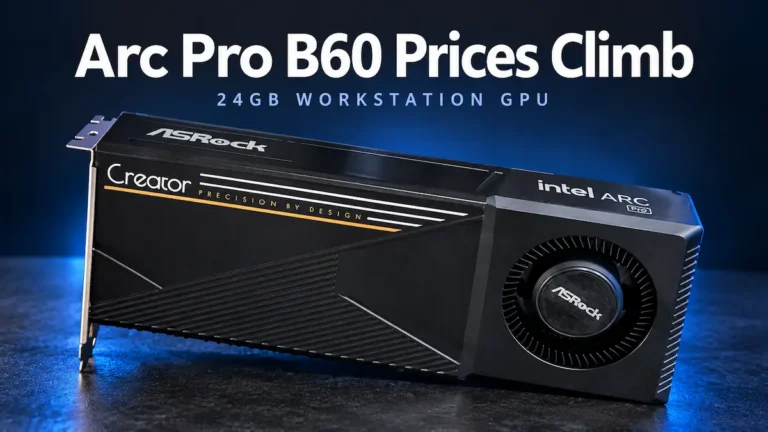
A budget graphics card needs to offer more than an attractive specification sheet. The price, the games you play, and the hardware already in your PC all matter. At $329.99 on Newegg, the ASRock Challenger Arc B580 12GB OC deserves a look—particularly because Newegg is advertising a free ASRock AIO liquid cooler with purchase for a limited time.
The combination could make sense for someone assembling a new system and shopping for both components. For someone who only needs a graphics card, however, the value calculation is different.
Affiliate disclosure: This article contains affiliate links. If you purchase through these links, we may earn a commission.
Prices, stock, and promotional gifts can change. Confirm the final price, included cooler model, and offer terms on Newegg before ordering.
The Main Attraction: 12GB of VRAM
The B580 pairs 12GB of GDDR6 memory with a 192-bit memory bus. That gives it useful breathing room for games and settings that put pressure on an 8GB graphics card.
More VRAM can help when high-resolution textures and other demanding settings exceed a smaller card’s memory capacity. It does not guarantee higher frame rates or eliminate stuttering, but it gives buyers more flexibility before memory capacity becomes a limitation.
That makes the B580 worth considering for 1080p gaming and selective 1440p gaming, provided expectations match the individual game. Demanding releases may still call for upscaling, reduced settings, or lighter ray tracing.

ASRock Challenger Arc B580 12GB GDDR6 PCI Express 4.0 x8 ATX Graphics Card B580 CL 12GO
🔥 Matches 60-Day LowASRock Challenger Arc B580 12GB GDDR6 PCI Express 4.0 x8 ATX Graphics Card featuring a 2740 MHz core clock and 12GB memory.
Put the $329.99 Price in Context
Intel launched the Arc B580 family starting at $249. This ASRock model’s $329.99 price is above that starting point, even though Newegg lists it below a previous price of $370.99.
The cooler promotion therefore matters to the deal. If you already need a compatible AIO, receiving one with the graphics card could reduce the total cost of your build. If you already have adequate cooling, the gift adds less practical value.
Check the included cooler’s CPU socket support and radiator dimensions against your motherboard and case. A bundled component only saves money if it fits your plans.
XeSS Adds Flexibility, With Game-Specific Limits
Based on Intel’s Xe2 Battlemage architecture, the B580 supports hardware-accelerated XeSS upscaling through its XMX AI engines. In supported games, XeSS reconstructs a higher-resolution image from a lower internal rendering resolution, helping improve performance.
Compatible titles can also offer XeSS Frame Generation, which inserts generated frames to improve perceived motion smoothness. Upscaling and frame generation are separate features, and support for one does not automatically mean a game supports the other.
Intel maintains an official XeSS game list. Check the features available in the games you actually play rather than assuming every listed title offers the same options.
There is no single frame-rate promise that applies across modern games. Resolution, graphics settings, ray tracing, CPU performance, and the selected XeSS mode all affect the result. Frame generation also works best when the underlying frame rate is already playable.
What to Check Before Buying
The B580 does not require constant tinkering, but a few compatibility checks deserve attention:
- Resizable BAR: Confirm that your platform supports it and that it is enabled in the BIOS. Arc performance can suffer substantially without it.
- Your existing CPU: An older processor can limit the benefit of a GPU upgrade. Look for benchmarks using hardware reasonably close to your own.
- Your game library: Check recent results for your most-played titles, including older games. Performance and compatibility can vary by engine and driver version.
- Power and physical fit: Verify the card’s dimensions, power connections, and power-supply requirements before ordering.
Keeping graphics drivers current is sensible, particularly when playing new releases. Beyond that, judge the card by the experience it delivers in your games rather than assuming every owner will need community fixes.
An Experimental Option for a DIY SteamOS Box
The B580 also has some appeal for enthusiasts planning a living-room gaming PC. Community testing has demonstrated SteamOS running on an Arc B580, including Steam’s gaming-mode interface.
That makes it an interesting possibility for a DIY SteamOS box, but experimental compatibility should not be treated as official support. The documented setup involved installation workarounds, and the tester reported graphics quirks and uneven results across games.
Valve’s SteamOS installation guidance currently focuses on AMD graphics for additional PC compatibility. Before buying a B580 specifically for SteamOS, check recent reports for your intended hardware and games. Windows performance figures should not be assumed to carry over unchanged.
Some Appeal for Local AI Experiments
The 12GB framebuffer may also interest buyers experimenting with local AI. Certain quantized 7B and 8B language models can fit within that capacity, depending on the model, quantization, context length, and software overhead.
Memory capacity is only part of the equation. Confirm that your chosen application supports Intel Arc acceleration before treating local AI as a reason to purchase.
The Verdict
The ASRock Challenger Arc B580 12GB OC is worth considering if you want additional VRAM, have a suitable ReBAR-enabled system, and have checked performance in the games you play.
At $329.99, its strongest selling point is the complete package for someone who can use the included AIO. Buyers who only need a GPU should compare current alternatives carefully rather than assigning the cooler its full advertised value.
For a DIY SteamOS build, the B580 is an intriguing enthusiast option with demonstrated community compatibility. For a straightforward gaming upgrade, the decision should come down to current pricing, your existing hardware, and recent game-specific benchmarks.